Tim Huckaby, Raconteur Extraodinaire, coming to Vermont.NET

If you *must* look up the definition: here!

Tim Huckaby, known simply as “Huckaby” to some, is coming to speak at Vermont.NET on May 10th. Tim lives in California, so to take advantage of the trip east, he and his wife will be doing an enviable little New England B&B tour (NH, Maine, etc.) before arriving in Burlington.

Besides his impressive c.v. (CEO of InterKnowlogy, INETA Speaker, MSDN RD, etc. etc. with some very impressive clients as well) Tim is a very entertaining guy. His .NET Rocks interview is a classic!

At the VTdotNET meeting, Tim will be doing a talk on Smart Clients that he will also be doing at TechEd.

Many thanks to INETA for bringing Tim all the way here from California. We have our next INETA sponsored speaker, another RD from California, in fact, Michele Leroux Bustamante, coming in June. Oooh are we going to have fun!

Visualizers and DataTables

I have been bitching for a while about the loss of the debugger’s ability to drill into a dataset/datatable in the same way that we could in VB6. There is even a project (I have yet to look at…sorry) on GotDotNEt to make up for this.

I have been told – just wait, visualizers will help!! But the Whidbey PDC bits did not have everything necessary. The new bits (VS2005 March Preview) do. And there are two great articles on using them. One is in Scott Nonnenberg’s weblog and the other is an article by Morgan Skinner in the current MSDN Magazine, which also explains DataTips and the totally awesome DebuggerDisplay attributes.

Before I get to Visualizers, I want to point out datatips if you haven’t seen or heard of them quite yet. DataTips are very much like QuickWatch, except they are available by hovering over the object you want to get information on. In general, debugging has been greatly improved for ado.net objects. In .NET 1.0 and 1.1, when you used Watch or QuickWatch to drill into a datatable, you could see how many objects were in the columns collection or rows collection, but you could not inspect those objects without explicitly typing that object (eg: mytable.columns(1)) into the debugger you were using. Now you can open up the datatable, and keep drilling in, right into the column and other objects to see the properties. Here is what that looks like using the datatips instead of QuickWatch, but the effect should be the same:

1) hover over object and datatip will popup up (note the plus sign is for the datatips, the spy glass is for visualizers)
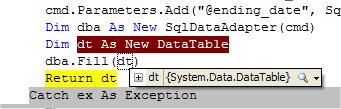
2) clicking on the plus sign exposes the structure of the datatable which is similar to what we see in 1.0/1.1
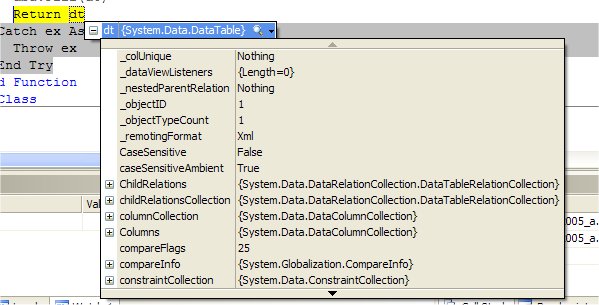
3) clicking on Columns is just basic info on the collection, again, not new yet…
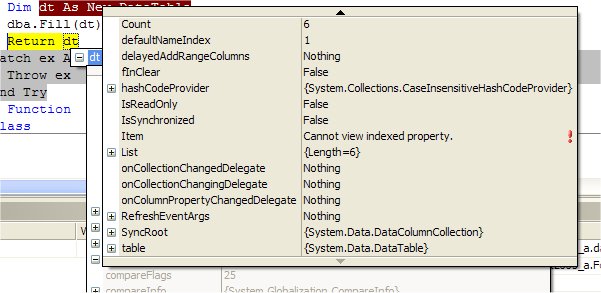
4) Finally I have selected list (the dimmed window behind), which shows the guts of the array that makes up the collection and from there, I selected items and …voila, here are the individual data columns. You can see that I can continue into them from here if I wanted.
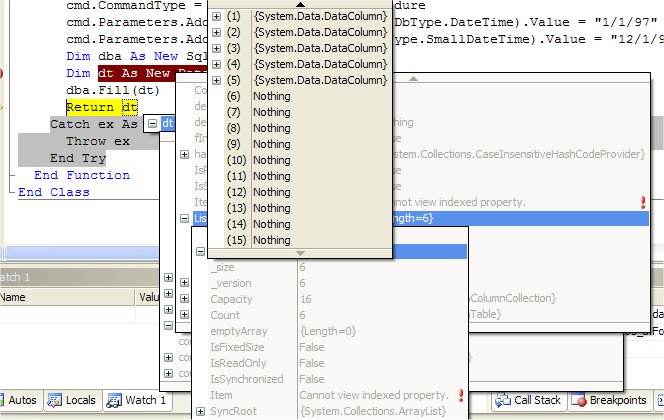
So this is where I will want to go do something with an inherited datatable class that uses debuggerdisplay attributes so that I can see something useful. Instead of
“(1) System.Data.DataColumn“, I’d MUCH rather see the name of the column.

But, not this weekend! Instead, what I did today (in C# no less and here’s the proof…)
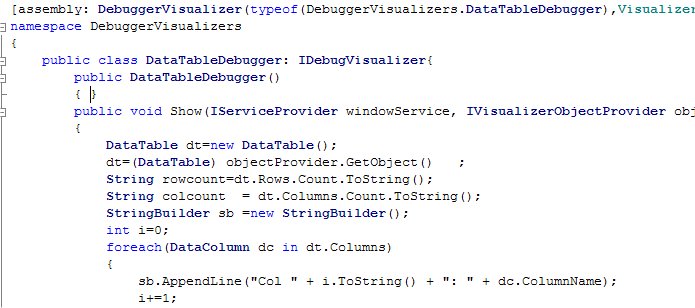
was write a visualizer that quickly exposes the info I am most often looking for quickly from a datatable. How many rows, how many columns and what are the names (and positions) of the columns.

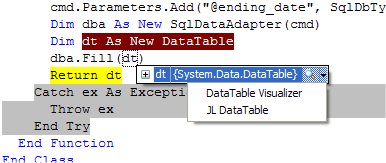
Here is my visualizer in action. You will notice that there are two of them here. One is a pre-written visualizer that was included in the install. It displays a simple grid of the actual data – the other most obvious thing I would be looking for. The second is the one I wrote.
And here is what you get when clicking on mine (JL DataTable)
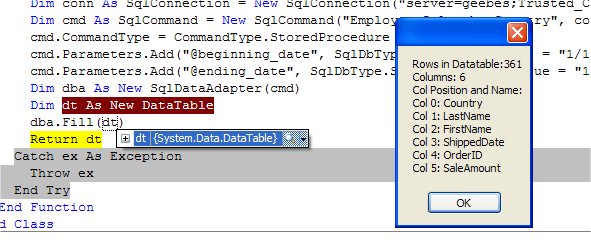
This is just the beginning – a few experiments. I only used a little messagebox. Imagine creating a gridview and populating it with the properties of datatable the way you want to see them and then drilling into the various properties, methods, collections that are exposed.

I like that idea!

I am even more excited about the debuggerDisplay attributes. I saw that at PDC (Kit George’s BCL talk) but he wasn’t using PDC bits and I spent a lot of time trying to get that to work in VB or C#, before I was finally told that I needed to wait for new bits. So those are here now, too. Whoopee! Morgan’s MSDN article gives a really great first look at the DebuggerDisplay and only your imagination (and some completely locked up classes) will stop you.

Remote Desktop – My new best friend

I love remote desktop. I have been using it for about 6 months. I have wireless at home, so I actually use remote desktop from my tablet and my laptop while sitting in different areas of the house to work on my main machine which is in the downstairs office.

When I travel, I use remote desktop to connect to that same box through a bunch of firewalls, of course. I do all of my emailing that way rather than having to transfer outlook data back and forth to my portable boxes or set up exchange on my domain server.

I use remote desktop to work on my clients machines also, through VPN. That is really sweeter than sweet.

With a full screen setting, it is completely transparent. And with a good internet connection, there is just no difference from being on that other box.

There are a few things that are wierd. For example, if I try to use FrontPage remotely, there is a message that my computer configuration has changed significantly and I need to reactivate the product.

There are still situations where I need to use PCAnywhere. Such as when I am working with a client on their machine and we both need to see what is going on and both need access to working on the desktop.

But I just love Remote Desktop. It has a huge impact on my productivity especially with all of the travel I have been doing lately. I definitely don’t take it for granted.

(man, that sounded like a testimonial, didn’t it? – wasn’t my intention)

Raisinettes, Milk Duds and Moose

Deer scat looks like a pile of raisinettes. Moose poop looks like a pile of Milk Duds (well more the elongated, like Peanut M&M’s).

I have been seeing a lot of Milk DUds in the past week. In our front yard and in the woods behind our house.

It was funny to see Dave Burke’s post this morning about seeing a moose while driving in So. Burlington. (Dave lives about 1/2 hour away from me here in Vermont). It is that time of year for sure.

My closest moose encounter was a few years ago when Rich adn I were hiking up on the Long Trail (that goes from the southern end of VT to the Northern, along the Green Mt.). THis was just a day hike though. The access trail where we were is an old logging road. Not 5 minutes out of the car and a female moose came out of the woods on to the trail and started heading up in the same direction. She stayed in front of us for about 20 minutes and did not care about us at all. She stopped to munch on some grass and pee along the way. We however were pretty nervous. It was rutting season (mating). We kept trying to scare her off the trail. THe problem is that if a male moose wanted to get to her, he would literally just run us over. They are extremely dangerous during rutting season. They are enormous animals and quite powerful and I have heard some pretty scary stories. I knew that I did not want to get in the way of a horny male moose. Was I looking over my shoulder? Absolutely! Finally after about 20 minutes, she went a different direction and we continued on up the trail.

It was really wonderful to be able to really watch this moose so closely for so long. To study her body and her movement.

Mike G’s new book made me break my golden rule

What’s my golden rule? No computer books in my bedroom. THat sounds a little wierd out of context. I read novels at night to clear my head so I can sleep. I will NOT read ANY technical anything. They are not allowed in my bedroom even – no magazines, no books. I got a copy of Mike Gunderloy’s book , Coder to Developer, yesterday and started looking at it and then started reading it and then continued reading it in bed before I went to sleep. I have been programming for 20 years, but it is still interesting for me to be reading this book because it refreshes ideas about certain things, gives me new ideas (I have heard of MindJet but had no idea what it was or about mind mapping – and I sure as hell bet that will be an awesome app to use with ink). ALso, it is great to see how other programmers (who have been at it for a long time and who I have a lot of respect for) go about their development process.

The book is geared at taking people who know a lot about coding, but do not really know about the scope of developing a project. These are skills that it takes years to evolve through experience and it’s a perfect book for someone like Mike to write.

I will surely be sharing more of my thoughts on this book.

This is a silly side comment, but I really like the cover, too.

Amy Sorokas gets sucked in to Microsoft

This does not surprise me at all! It makes perfect sense. The funny part is that Amy was in Redmond when we were there for the summit. “For some meetings”, she said. Her hubby was there, too. Must have been doing some house hunting, eh? Considering the description of her new job, it looks like I will get to interact with her at least as much as I have in the past. Amy is the first person who ever told me about INETA way back when.

Question/Request for Channel 9 Tablet Team interview

Sorry – I just couldn’t bring myself to register for yet another web site community so I am posting my question on my blog instead of over here where we are supposed to.

I really hope hope hope that you SHOW the tablet pc in use. So many people haven’t seen them. Show it doing that flippy thing if you have a convertible. Show the unbelievable hand writing reco. Show someone walking around with the tablet dictating to it (I just started doing that – it’s *really* cool). Show things I can’t show by typing in my weblog.

(I imagine that the video probably can’t capture the screen too well or at all, but if you could try….. 🙂 )