The somewhat super secret MSDN docs on EF6

Along with all of the great info on entityframework.codeplex.com, the MSDN Library has a bunch of documents targeting EF6, currently listed as “Future Version”. There is a “Future Version of EF” page but it doesn’t have links to these articles. And I’ve found some of these to be more current than their related specs on Codeplex.

I’ve only ever found them accidentally via GoogleBing or when bugging someone on the EF team and they send me a link. Since I haven’t found a single location with these links, I am really just selfishly creating this list for myself.

Keep in mind that I may have missed some!

Coding for Domain-Driven Design: Tips for Data-Focused Devs

In honor of the 10th Anniversay of Eric Evan’s book: Domain Driven Design, Tackling Complexity in the Heart of Software (Addison-Wesley Professional, 2003), I’ve written a 3-part series for my MSDN Data Points column.

August 2013: Data Points: Coding for Domain-Driven Design: Tips for Data-Focused Devs

Domain Driven Design can help handle complex behaviors when building software. But for data-driven devs, the change in perspective isn’t always easy. Julie Lerman shares some pointers that helped her get comfortable with DDD.

September 2013:Data Points: Coding for Domain-Driven Design: Tips for Data-Focused Devs, Part 2

In the second column in her series on Domain Driven Design, Julie Lerman shares more tips for data-first developers who are interested in benefiting from some of the coding patterns of DDD.

October 2013: Data Points: Coding for Domain-Driven Design: Tips for Data-Focused Devs, Part 3

Julie Lerman explores two important technical patterns of Domain Driven Design (DDD) coding–unidirectional relationships and the importance of balancing tasks between an aggregate root and a repository–and how they apply to the Object Relational Mapper (ORM), Entity Framework.

My Long-Running, Not-Yet-Complete, Investigation into a New Haswell Ultrabook

(I’m updating this post frequently as I learn more about these machines or about ones I haven’t looked at well enough yet)

Dec 18 update:

The search is over! I’m in Love!

Well, the Samsung Ativ Book 9 Plus  (8GB RAM, 256GB SSD) arrived late one night last week. The poor Fedex driver showed up at my house at 9pm and still had 15 deliveries to go after mine. I gave him a piece of home-made apple pie for the rest of his journey. I’ve now had the Samsung for 5 days and yesterday I cancelled the not-yet-shipped-after 4 weeks Dell XPS13. I was already in love with the Samsung so there seems to be no point in doing a comparison.

It’s light (3 pounds), quiet (unless I’m stressing it out), much faster than my Thinkpad (I did some geekbench comparisons) and I just love looking at the battery status and seeing “5 hours left” “7 hours left”. I love the keyboard and after struggling with the thinkpad’s eraser mouse and touchpad for so many years, I took to the Samsung’s touchpad “like a duck to water”. I had to do a bit of finagling to get my RDP setup to handle its super duper high res but am now using it as my full time machine with the ehinkpad nearby in case I forgot to install or copy anything.

I will definitely write a blog post at some point.

Amazon now has these available now on a pretty steady basis.

Dec 4 update:

Dell started selling the XPS13 a few days after my last update so I ordered that although it wouldn’t be shipping for over 4 weeks from when I ordered! Then Samsung’s shipping time went down to 1-3 days so I called to order one on Nov 20th. But I was told that the pre-orders were going out and they wouldn’t be able to ship one to me until Dec 13. I went ahead and placed the order. Was frustrated to see them shipping on Amazon with no wait about a week later but such is life. But I was excited a few days later to get an email that it shipped. The box arrived today. It was suspiciously light…much less than 3 pounds. All they had shipped was the free laptop sleeve that is part of their p.r. I have no idea when I’ll get either laptop and it’s driving me batty (blame A.D.D.). When I ordered the Dell, they had a promo for free shipping, free returns and no restocking. This means I get to try it out and if it’s not the one, it won’t have cost me anything (money, that is). Samsung was close with free shipping and no re-stocking fee. It is the only way I can get a hands-on look at these since they are definitely not available in our local Best Buy or Staples. And they won’t be for a while. We are a minor market. I couldn’t even find the 4GB/128SSD version of the Ativ at our BestBuy. So the wait continues. I’m guessing the Samsung will be the winner. Getting it to me weeks before the Dell would have helped dramatically because I would have grown fond of it by then. In the meantime, I have some friends who grabbed the Ativ on Amazon and are loving it. Today, it looks like the window of Amazon having those on hand is gone. Better wait in line behind me! 🙂

November 16 update:

Samsung ATIV Pro book 9 is announced but not on amazon anymore and not shipping from Samsung for at least a month. Dell XPS 13 is now orderable from their website but not shipping for another month. I have reconsidered MacBook Air but I really really really want touch! I have looked more closely at the Yoga Pro 2 but am reading enough negative stuff about it that it’s still a no (and I’m a long time thinkpad tablet /laptop user). I have reconsidered the Acer S7 but still want FKeys (even though other dev friends are okay with it). I have checked back with Toshiba Kira but they seem to be clueless about the reported fan noise complaints. I got hands on with the Surface Pro 2 but decided that I can’t use Visual Studio on that tiny screen when I’m presenting at conferences etc. I do want to do this before the end of the year (think: taxes). I thought I would pre-order the XPS13 and just return it if I don’t like it (current promo says no restocking fee) but the chat support was unable to 100% confirm key info about order/invoice/shipping dates that would affect this promo and I remembered that I don’t want to depend on Dell support anyway). I’ve re-checked other options (e.g. Asus, Sony) and still don’t want them. I’ve learned that there are issues with Windows 8 and the new fancy hi res screens but expect them to get resolved. I have had a thousand repeated recommendations on twitter from kind people who don’t realize I’ve spent about 40 hours obsessing over this already and have considered everything they are suggesting already. So I’m going to try to set it aside and wait a little longer. Today’s thought is that the Samsung will win. But I’m fickle and a crazy Libra so we’ll just have to see…)

Anyone who follows me on twitter may be familiar with my ridiculous, drawn out, indecisive process when i have to buy new gear. It’s time for a new laptop. I’ve been thinking about it for months. Because of this I have the added problem of forgetting what I liked or didn’t like about certain machines.

Here’s what I know I want:

  • Intel Haswell chip for long battery..most likely i7, but i5 could suffice
  • Light! I am hoping for under 3 pounds.
  • Min 8GB RAM
  • Min 256 GB Drive
  • Quiet because even though I record my Pluralsight & other videos on my desktop, I need to have my laptop running at the same time.
  • In my hands and ready to head off to conferences with me at the end of this month!

I do production code and video recording and run VMs on my desktop. Everything else on my laptop including pick it up and go when I travel. So I don’t need quad core heavy duty on the laptop.

What I’ve looked at seriously:


Acer Aspire S7-392-9890 13.3-Inch Touchscreen Ultrabook

This is under 3 pounds. It claims a 7 hr battery life. According to a number of friends, the previous version (Ivy Bridge) has a lot of fan noise. Perhaps the Haswell version is quieter, but there is a possible showstopper for me: no F keys. The number keys serve as number and FKeys meaning that you have to do learn new key combos to Run or Debug an app in Visual Studio etc etc. Or to use Zoomit. I just don’t know if I want to make that commitment.

Showstopper: No F Keys


Toshiba KIRAbook 13 i7 Touchscreen Laptop

Cori Drew loves hers even though she threw it across the room (accidentally as she was wandering around looking for wifi because hers has a faulty wifi card or something like that). But, it’s got amazing resolution – to compete with Mac’s Retina display, is very light, very high end and very well built. Plus she says the customer service is fantastic. But….here we go again….the fan is crazy noisy. Crazy noisy like in a room full of developers, all eyes will suddently be on her becaus eof the fan. Many reviews complain about this as well. This just won’t work for recording.

Showstopper: Head turning fan noise


Samsung ATIV Book 9 NP900X3E-K01US 13.3-Inch Full HD Premium Ultrabook

Everything I’m looking for and 2.6 pounds, but this excellent Engadget review mentions the fan noise:

The ATIV Book 9 Plus pipes up quickly — heck, it sometimes makes noise when it’s sitting idle. But that noise never rises above a quiet sigh. In fact, we didn’t even notice it until we paused Pandora and started to work without any background noise.

“Quiet sigh”….I have worked hard to reduce the noise in my office for recording. I don’t know how loud a quiet sigh is but since it’s loud enough to write a whole paragraph about, I’m guessing louder than I want.

Showstopper: Fan noise?  SCREECH: wait, forget the fan noise, only 4GB RAM Max??  128GB drive? Not upgradable? Pfft!


The 8GB/256SSD is now listed on Samsung’s site:http://www.samsung.com/us/computer/pcs/NP940X3G-K04US  You can pre-order but it says “ships in 3-4 weeks” (I’m writing this on Nov 16)

Amazon has a place h older page but it’s not yet orderable: http://www.amazon.com/Samsung-NP940X3G-K04US-13-3-Inch-Laptop-Mineral/dp/B00F6EOB8C

Apple MacBook Air MD760LL/A 13.3-Inch Laptop (NEWEST VERSION)

Yes, a macbook! Many friends use MacBook Pro with Windows & Visual Studio development. But the 2013 MbA has a haswell chip and can come configured with 8GB RAM and up to a 512GB drive. It doesn’t have the Retina display but that was one of those features I didn’t know I needed. It’s under 3 pounds. I could get a Pro with Retina display for another 1/2 lb but a quad core mac book pro is a 4.5 lb 15” computer. That’s about what I have now (though obviously much nicer, longer battery life and more powerful). But size matters, too! 🙂

Cons are no touch screen. I use my touch screen a lot on my laptop. I would miss it madly.

I’m going to be near the local Apple reseller today and will try them out. I’m hoping they’ll have Airs and Pros with Win8 installed on them.

Dell XPS 12 Convertible Ultrabook

I’d ignored this because it’s weird looking but that’s silly.Very high end, great graphics, 8+ hrs of battery.

It’s also 3.35 pounds, which I know is negligible and still a lot less than the 4.75 lbs of my thinkpad when I have the extra battery in it (which is always when I’m travelling)

Sony VAIO Pro SVP13215PXB 13.3-Inch Core i7 Touchscreen Ultrabook

Forgot that I had looked into this , perfect in every way but:

showstopper: fan noise (http://forum.notebookreview.com/sony-owners-lounge-forum/720737-official-vaio-pro-13-owners-lounge-svp13-2013-a-88.html) & http://forum.notebookreview.com/sony/726097-sony-vaio-pro-13-fan-noise-return.html

🙁

ThinkPad X1 Carbon Touch

(I can hear Scott Hanselman now, “’all that research and you missed my blog post review?”.

“starting at 3.4 lbs” so I wasn’t really looking at it. Plus in the comments of Scott’s post, another owner says “One other thing that really bothers me is that the fan is running at a quite noisy level – constantly”. 🙁

Currently they are built with 3rd generation chips. Looks like Haswell machines won’t be out until January 2014.

Am I asking too much?

Am I being too much of a stickler about the noise? Head-turning loud (Kirabook) is really impossible for me for recording. Maybe the Samsung Kiva’s “quite sigh” is not going to be a bad thing after all. I just need some more feedback on that. I just don’t want to buy something, make the effort of setting it up and then decided I don’t like it.

Coming soon but not soon enough for my pre-conference hopeful deadline:

Not to be overlooked is the new Surface 2 Pro. It will also be light, fast, long battery life, touch screen etc. But I really wanted to have something before I head off to conferences at the end of this month so that’s not doable unless I keep waiting and lug my thinkpad around for more trips. And I want to hear what my friends say about it before I buy one.

Dell: Precision M3800 workstation: 4.5 lbs …NOPE

Dell XPS 13 Ultrabook  about 3 lbs, but still “coming soon…”

Availability and Pricing  (source Oct 2 press release)
The Dell Venue 7, Venue 8, Venue 8 Pro, and new XPS 15 will be available from October 18 on www.dell.com in the United States and select countries around the world. The Venue 11 Pro, XPS 11 and the updated XPS 13 with touch will be available in November. Starting prices are as follows:

  • New XPS 15: $1,499.99
  • XPS 11: $999.99
  • New XPS 13: $999.99

What’s that Read_Committed_Snapshot Transaction Support for EF6 About Anyway?

One of the items listed in the EF6 specs is:

  • Default transaction isolation level is changed to READ_COMMITTED_SNAPSHOT for databases created using Code First, potentially allowing for more scalability and fewer deadlocks.


I’m no database wizard, so I have mostly just glazed over that. It’s one of those changes that most devs take for granted…some default setting changed, it’s a better default…okay, thanks… But I’m a bit of a plumber and don’t like to take much for granted. I wanted to see a before and after.

In all honesty, I initially misread this. If I did,I’m sure a few others have as well. I didn’t even know what this transaction level was…but I only know enough to be dangerous about database transaction levels anyway.

So I started by looking to see if EF6 was setting this transaction level in it’s internal code when it created connections to do queries or other commands.

WRONG!

I read more closely and started looking for the database creation code in EF, thinking that it sets this transaction level in order to execute the various commands to create the database and schema.

WRONG AGAIN! 🙂

So I started looking into dbtransactions and there is no such isolation level!

Here’s the documentation:

image

Where is READ COMMITTED SNAPSHOT?

Not there because I was WRONG AGAIN! 🙂

Finally I started noticing that READ_COMMITTED_SNAPSHOT is a SQL Server database setting, not an on the fly setting for a specific transaction. It is an ON/OFF switch. Your database either uses a snapshot or it does not. (Please let me know if I’m wrong about it being SQL Server only. It’s all I’m able to find.)

So it’s a parameter that needs to be set when creating a database. AHA! Up through EF5, EF was ignoring that setting when creating a database. But it turns out that it’s something of a “best practice” to have that setting ON.

What does it mean to have READ_COMMITTED_SNAPSHOT ON for SQL Server database?

Nick Beradi provides a nice explanation in his blog post, Deadlocked!: “read committed snapshot” Explained.

Basically what this does is create a snapshot or read-only database of your current results that is separate from your live database. So when you run a SELECT statement, to read your data, you are reading from a read-only copy of your database. When you change your database, it happens on the live database, and then a new copy or snapshot is created for reading against.

So now, as a plumber, I know how to show before and after. 🙂

Here I’m asking SQL Server what the setting is for my database named EFDataLayer.ThingieContext which was created by EF5:

image

The value is 0. Read_Committed_Snapshot is OFF.

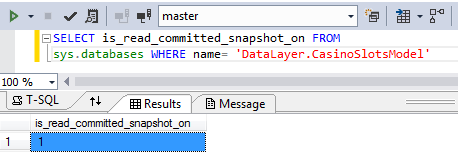
Here’s another one, but this one was created by EF6:

image

The value is 1. Read_Committed_Snapshot is ON.

That’s the change. Most of us will never even notice it. But it will alleviate problems like this one, one of many in stackoverflow (and disregard the response, which is not marked as an answer for a reason 😉 ) http://stackoverflow.com/questions/17529064/using-read-committed-snapshot-with-ef-code-first-5

But I Don’t Want That ON by Default

You can always go to the database and call

ALTER DATABASE MyDatabase
SET READ_COMMITTED_SNAPSHOT OFF

I Just Want to Use Snapshot On-Demand

That’s what the transaction level support is for.

You can always create your own transaction and set the isolation level to SNAPSHOT for specific command execution.

Next Steps?

You have now reached the limit of my Snapshot “expertise”. For more, check out the MSDN doc on Snapshot Isolation in SQL Server or try googlebing or maybe this (#itsATrap!).

Reusing a Virtual Machine with Windows 7 and Handling Genuine Windows issues

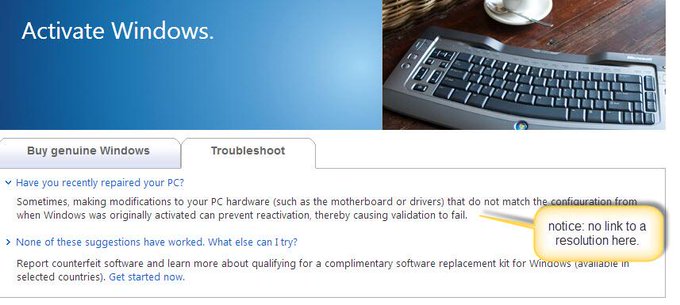
Since I am using this VM copy ONLY to do some testing & research of Visual Studio 2013 RC, I don’t believe that I’m abusing any licensing requirements, especially since this license is from an MSDN subscription which is aimed at using the license for testing & development purposes. If this ends up reverting (as Martin suggests below) before I finish my research, I’ll just use another one of the license keys provided by my MSDN subscription.


julielerman's avatar Julie Lerman@julielerman

copied a VM w Win7to use for some testing & can’t get rid of the "not genuine windows" pestering. Love this guidance: pic.twitter.com/e3xsE2EmDN

Story image

_____________________________________________________

julielerman's avatar sad part is taht I’ve gone through this before and don’t remember how to fix. Now will ahve to spend that time AGAIN …bad me

_____________________________________________________

robertmclaws's avatar Robert McLaws@robertmclaws

@julielerman Try opening a command prompt as admin and typing slmgr -rearm and see what happens.

_____________________________________________________

julielerman's avatar Julie Lerman @julielerman

@robertmclaws restarting and crossing my fingers! 🙂

_____________________________________________________

julielerman's avatar

This worked! 🙂 RT @robertmclaws: @julielerman Try opening a command prompt as admin and typing slmgr -rearm and see what happens.

_____________________________________________________

aafvstam's avatar Maarten van Stam @aafvstam

@julielerman @robertmclaws careful.. May just have extended the grace period and see it again later on #fromwhatirememberloooooongago

_____________________________________________________

TRayburn's avatar  Tim Rayburn @TRayburn

@julielerman And this time you’ll blog about it, so it’s permanently committed to your google-able brain?


To Tim: DONE! 🙂

virtual machine vm genuine windows license win7

Hooray! See Upcoming Appointments in Outlook 2013

I am but one of thousands of Outlook users who were flabbergasted that Microsoft removed future appointments from the ToDo Bar in Outlook 2013. You can only see what’s happening on the day that is selected.

image

Not only does the calendar not BOLD the dates with appointments, it doesn’t show me what’s coming up in the next week or so besides the single 9pm appt I have tonight. I have an important appointment tomorrow afternoon but I won’t know until I open up outlook tomorrow. If I had to be somewhere at 8am tomorrow morning, I could completely miss it because I may not see the reminder until tomorrow morning.

This was a show stopper. I have really bad short term memory. I had grown very dependent on the constant reminders every time I looked at my email about what work, vet, hair, user group, dentist etc etc appts I had to be aware of in the next week or so. And the Outlook 2013 solution is either to open up the Calendar or start clicking around on the ToDo calendar. This takes explicit thought  and multi tasking. Not for me. Not at all.

Many simply refused to upgrade from Outlook 2010.

There were no add-ins that solved the problem.

Until now.

A friend who refused to update to 2013 for this reason pointed out this Coding4Fun blog post : Bringing some Outlook 2010 features into 2013 with this add-in… to me this morning. It leads to the VSTO download on codeplex. I realize that I downloaded an earlier version of this in April but never succeeded in installing it and must have just given up and forgotten about it. With today’s reminder, I tried again with the latest version. I had the same install problems today but finally solved them!

Installation Problem …. Solved

I use Chrome by default. I downloaded. Unblocked. Unzipped. but when I attempted to install, got the dreaded “Deployment and application do not have matching security zones” error message. This typically happens when you try to install right from the web without explicitly downloading, unblocking and unzipping. I tried repeatedly. Restarted my computer. Googled again and again. Finally I opened up IE, downloaded, unblocked, unzipped and installed. It worked.

See Future Appointments

I’ve closed the other ToDo bar since I only use the calendar. Otherwise I’d have to devote more of my outlook window since I can’t seem to stack the panes for the ToDo bar and the Appointment window.

I’ve set this to show me the next 7 days and to show me my local calendar, my Windows Live calendar and the internet calendar. You can see that I’ve gotten in the habit of copying my LIVE calendar to my local calendar and vice-versa. I’m not ready to go 100% dependent on the web-based calendar. So now I’m seeing the duplication but better safe than sorry. 🙂 (I’ll get into modern times soon). The tool did not black out those appts tomorrow. I did. They are private. 🙂

image

It has a feature to alert you when new mail comes in via the windows notification bar. I get a lot of mail so that is definitely a feature I disabled quickly.

Drag and Drop Emails to Create Appointments

Another Outlook 2010 feature that was inconceivably axed from 2013 was the ability to drag and drop emails onto the calendar to create appointments. It is another feature I used all the time and saw almost as many complaints on the web about its disappearance as the future appointments.

That’s back thanks to this add-in.

Go Get It!!

Here is the codeplex download page: https://outlook2013addin.codeplex.com/.

The codeplex project is created by a mystery author: https://www.codeplex.com/site/users/view/gamosoft

I am not a fan of developers who have public projects hiding behind an alias. I just want to pat their back and thank them publically and set them on a little pedestal. Maybe gamosoft is hiding because he or she is a Dalek or Cyberman or something? (yes, I’m watching too much doctor who lately)

Accidental Learning

In my Pluralsight course, Automated Testing for Fraidy Cats Like Me (an introduction to Unit Testing and TDD), I presented a use case that required retrieving  the date of a person’s most recent tweet.

The process of accomplishing that and then completely reworking it again this morning, made me think some more about how we accumulate knowledge even when we don’t have the need or time to take on learning about a big topic.

I’ve learned a lot of things by accident and because I’m curious and something of a pit bull, these become detours to otherwise productive days.

If you follow me on twitter, you see the random, seemingly unrelated things that I’m constantly wrestling with. Here’s an example.

Many Moons Ago, I Had a Silly Idea

I started with a stub method that just returned a date but I wanted to make it a little more real. I ended up spending hours and hours on this, trying to figure out the non-authentication API call to get the data.

Finally I was able to come up with a way to do that:

https://api.twitter.com/1/statuses/user_timeline/julielerman.json?count=1

Note that this was using version 1 of the twitter API and did not require authentication so it was easy enough to use this in my sample.

Then I needed to call it. I wasn’t used to making web calls from outside of some type of web application. So it took me a while to realize that I needed to use System.Net.WebClient.WebClient to execute the call. And exactly what call I wanted to execute took some time to discover as well. Naturally. It turned out that I wanted to use the DownloadString method.


 var uri = new Uri("https://api.twitter.com/1/statuses/user_timeline/" + twitterAlias + ".json?count=1");
 var client = new WebClient();
 var result = client.DownloadString(uri);

So I finally have the tweet. It’s was as string …not pretty. And I had to parse it to get at the DateCreated. I did some more searching and came upon a library I’d heard of (always with accolades!) countless times but had never had the chance to use: JSON.NET.

A little more exploration helped me learn I could use the API’s JObject class to parse the string into a recognized object

const string constTwitterDateTemplate = "ddd MMM dd HH:mm:ss +ffff yyyy";

and then extract the property I wanted:

o["created_at"]

But that didn’t work because it turned out that twitter has it’s very own special way of representing a date. Uggh! Back to GoogleBing for quite some time and I finally came up with the format and then how the heck to transform that format into one that could be read by .NET.

const string constTwitterDateTemplate = "ddd MMM dd HH:mm:ss +ffff yyyy";
var createdAt = DateTime.ParseExact((string)o["created_at"], 
        constTwitterDateTemplate, new System.Globalization.CultureInfo("en-US"));

Finally! I had a System.DateTime I could use!

In the end, I had a handful of lines of code to do what I wanted

public DateTime LatestTweetDateAsUtc(string twitterAlias)
{
  var uri = new Uri("https://api.twitter.com/1/statuses/user_timeline/" + twitterAlias + ".json?count=1");
  var client = new WebClient();
  var result = client.DownloadString(uri);
  var jsonString = result.Replace("[", "").Replace("]", "");
  var o = JObject.Parse(jsonString);
  const string constTwitterDateTemplate = "ddd MMM dd HH:mm:ss +ffff yyyy";
  var createdAt = DateTime.ParseExact((string)o["created_at"], 
    constTwitterDateTemplate, new System.Globalization.CultureInfo("en-US"));
  return createdAt;
}

But it had taken me hours and hours and hours to get to this.

The upside is that I learned about JSON.NET and got a basic understanding of its use.

The date transformation is one of those esoteric things I will forget I’ve done and have to search on the web next time I find I need to use it…this could be years from now. And WebClient…that could come in handy but I don’t foresee a lot of use for the work I do.

Other than the long-overdue exposure to JSON.NET, it was a wasted afternoon.

6 Months Later, I Came Across a Better Way

What I hadn’t discovered was TweetSharp. Because the v1 Twitter API is now depracated, I have to use v1.1. But v1.1 requires EVERY CALL to be authenticated.

So I had to sign up for an application key (https://dev.twitter.com/apps).

Then I looked for some help with how to authenticate my app. The code was a nightmare. More learning curves.

Then I found TweetSharp.

Within 1/2 hr I had authentication set up and figured out how to get a users’s latest tweet. And the best part was TweetSharps Tweet class does the work of transforming the date to a DateTime for you. (Using JSON.NET and possibly code similar to mine. I get I can figure that out by looking at the code on github. 🙂 )

      var service = new TwitterService(_my_ConsumerKey_providedbytwitter, my_ConsumerSecret_providedbytwitter);       service.AuthenticateWith(my_Token_providedbytwitter,my_TokenSecret_providedbytwitter);       var user = service.GetUserProfileFor(
new GetUserProfileForOptions {ScreenName = "julielerman"});       var tweet = service.ListTweetsOnUserTimeline(
new ListTweetsOnUserTimelineOptions{ UserId = user.Id, Count = 1 }).FirstOrDefault();       DateTime thedate = tweet.CreatedDate;

So….for many, nothing new here.

A Lesson Bigger Than Just The Code

What’s more interesting to me than the actual solution is the process I went through. Getting that twitter date was just a made up scenario that I decided to pursue for my example. It stopped me in my tracks and I became consumed in solving it, not once but twice. First when I was building the course and second when I wanted to share *that* code and discovered the API no longer worked. It’s fun to learn new little things that don’t require you to read a whole book. So I now know enough to be dangerous about JSON.NET and about TweetSharp. However I’m well aware of my limitations.

It also interested me to consider how this process, repeated over the years, has resulted in my having a quiver filled with a slew of little bits of very useful, somewhat scattered, information. This is very different than learning a big topic, like testing or Entity Framework. However they are a starting point at which I can leverage the tool and make it work for me.

Which somehow ties back to my keynote at CodeStock this summer where I spoke about approaching big learning curves one small bit at a time. For example how I’m currently using and benefitting from pieces of Domain Driven Design even though I’m a long way from understanding or being expert at the *whole* thing. However my pursuit of DDD is hardly accidental! I’m working diligently to understand it and use it (and share what I’ve learned).

I’m not sure if I’ve wrapped up with anything useful here but I got what I was thinking about out of my head so I can get back to wrestling with my next topic!

Entity Framework, Private Constructors and Private Setters

As I learn more and more from Domain Driven Design, my classes for DDD projects (those that are complex enough to need more than simple CRUD), are shifting from what are referred to as “anemic domain models” and more like “rich domain models”.

The term “anemic domain model” (which I still have an aversion to…the term, that is) refers to a class that doesn’t really do much at all. It has a bunch of properties and maybe some methods. To use them you instantiate or retrieve the object and then populate the properties at will. When working in DDD, the focus is on behaviors, not properties. So you would have methods to control what happens to  your objects and in doing so, constrain the properties so that they are not exposed to be set or modified “willy nilly”.

Here is an extremely simple pair of classes that are designed using some of the techniques I’m learning from DDD:

  public class AThingAsEntity
  {
    private AThingAsEntity(){}  //the private constructor

    public AThingAsEntity(string description, int anInt, string aString)
    {
      Description = description;
      SomeOtherThing = new SomeOtherThing(anInt, aString);
    }

    public int Id { get; private set; }
    public string Description { get; private set; }
    public SomeOtherThing SomeOtherThing { get; set; }

    public void TheOtherThingMustChange(int anInt, string aString)
    {
      SomeOtherThing = new SomeOtherThing(anInt, aString);
    }
  }
  public class SomeOtherThing:ValueObject<SomeOtherThing>
  {
    private int anInt;
    private string aString;

    private SomeOtherThing(){} //the private constructor 
   //this value object’s constructor is internal to prevent random instantiation
internal SomeOtherThing(int anInt, string aString) { AValue = anInt; AnotherValue = aString; } public int AValue { get; private set; } public string AnotherValue { get; private set; } }
 

I’m constraining the class so that anyone who instantiates it is required to pass in some values. And those values all have private setters. There’ s no way to write code like:

var thing=new AThingAsEntity();
thing.Description="oh i'll just put whatever I want in here. heh heh heh. Domain rules be damned";


That’s the way I want to write this class to represent my domain.

In the past week or so, I’ve been asked three separate times (by three different developers) if it’s possible to use this pattern of private setters with EF. The answer is “yes”. Here, let the Doctor confirm that:

And in case you’re curious, I’m doing this with EF5.

Entity Framework requires a parameterless constructor in order to materialize objects returned from queries (or loading). I  have made this concession in my class but notice that it is a private constructor. So I’m still protecting my class. Nobody can access it. But EF is still able to populate this class when I execute queries. And no, I’m not doing some magic to tell EF to use my public constructor. It really uses the private constructor.

I’ll use an integration test to demonstrate.

Note that my test is using an initializer called SeedMyThings to always drop and recreate the database and shove in this seed data:

      new AThingAsEntity("This is MY thing", 42, "That is the meaning of life")

My test sets that initializer so I can perform the test I’m interested which requires some seed data.

[TestClass]
  public class Tests
  {
    public Tests()
    {
      Database.SetInitializer(new SeedMyThings());
    }
    [TestMethod]
    public void EfCanPopulateObjectWithPrivateCtorAndSetters()
    {
      using (var context=new ThingieContext() )
      {
        var thing = context.Things.FirstOrDefault();
        Assert.IsInstanceOfType(thing,typeof(AThingAsEntity));
        Assert.AreNotEqual(0, thing.Id);
        Assert.IsFalse(string.IsNullOrEmpty(thing.Description));
        Assert.IsFalse(string.IsNullOrEmpty(thing.SomeOtherThing.AnotherValue));
      }
    }
  }

I know…all those Asserts…bad tester.  So shoot me. 😉

Anyhooooo…. the test passes. Even with my private ctor and private setters, EF is able to materialize the object and even it’s SomeOtherThing property which is a value object. (which also has a private ctor and private setters). Internally EF is reading the metadata of the model and using reflection to set the values of the properties.

I also want to point out that I had been using a protected constructor. In the past, I am sure I tried private and it didn’t work. (Maybe an earlier version of EF?) But Steve Smith asked me “if setters work as private, why not constructor?” So I tried it and voila, it worked too.

And now, for my first EVER public Git repository. You can find my little sample solution at https://github.com/julielerman/EF_and_Private_CTORs_n_Setters. 🙂

After 3 Years, Devs are Still Finding Programming Entity Framework 2ed Useful


I spent a year writing the 1st edition of my book Programming Entity Framework and then another year revising it for EF4 which resulted in the 2nd edition. After that Microsoft released DbContext (which sits on top of the ObjectContext for simpler coding) and Code First that sat on top of EF4. EF5 was mostly a consolidation that also took advantage of 3 new features in .NET 4.5 (enums, spatial data and query caching). VS2012 brought some nice designer improvements and a default DbContext/POCO code generator. EF6 mostly adds some advanced features to what’s already there.

But what hasn’t changed much are things like LINQ to Entities, security, ESQL, how transactions work (small change coming in EF6), databinding, code generation,and most importantly the Entity Framework internals. It is understanding the internals that give you real power over Entity Framework – not relying on the #efhelp hashtag, stackoverflow or the kindness of strangers.

It was really nice to see this brand new 5-star review of my 2nd edition book (screenshot below).

Not only does this book cover explain Entity Framework from a programming point of view, but it pulls back the covers to explain the many options available. The many comprehensive real life examples that Julie Lerman provide make this a programming Bible for Entity Framework. Whether you are using views, stored procedures, user defined functions, the T4 generator, Entities or POCO’s, Julie Lerman can help you come up with the solution that works for you.”

I still believe that a combination of the shorter focused books Programming Entity Framework DbContext and Programming Entity Framework Code First with the 2nd edition book for deeper understanding of specific topics – almost as a reference now – packs a “one-two” punch for entity framework.

And as you may know, I’m making my bigger investment in Pluralsight videos now. I have 10 videos alone on Entity Framework already along with one which is a Beginner’s training on Unit Testing & Test Driven Development.

I wrote a blog post recently on the recommended order for watching those Pluralsight videos along with suggestions to help you decide which is correct for you.

I still keep thinking about updating one or more of the Programming Entity Framework titles, but while each of the few dozen strongly worded pleas I have received to do so are tempting, a few dozen still does not justify the effort.

image