My Current Pluralsight Courses on Entity Framework

Pluralsight - Hardcore Developer Training

Course Released Hrs:Min
Entity Framework 4.0 By Example Aug 2010 2:19
Entity Framework and Data Models Nov 2010 1:32
Designer Supported EDM Customization Jan 2011 2:05
Querying the Entity Framework Feb 2011 1:23
Entity Framework 4.1 – Code First Jun 2011 1:59
Entity Framework 4.1 – DbContext Sep 2011 1:21
Data Layer Validation with EF 4.1+ Feb 2012 1:54
Entity Framework Code First Migrations  Mar 2012 1:10
Getting Started with Entity Framework 5 Mar 2013 4:23
Entity Framework in the Enterprise  Sep 2012 3:16


Need a free 30-day trial for Pluralsight to check out my courses? Send me a note on my contact form

CodeStock Keynote and Maybe Some Sessions, too

image I’m thrilled to have been invited to deliver the keynote talk at CodeStock 2013 in Knoxville this July. I’ll be talking about how Domain Driven Design (DDD) has inspired me a-new after almost 25 years of software development. And I hope to inspire others to take a closer look at DDD as well.

In addition to the keynote, I submitted two conference sessions and sessions are selected by a voting process where registered attendees vote for the talks they want to hear. Such a cool idea.

I feel a little guilty submitting sessions since I already will be presenting the keynote and there are so many awesome abstracts including some on EF and DDD.

Here are the two talks I submitted if you’re planning to attend CodeStock and interested in hearing me go on about them. But if that’s the case, you’ll need to go vote.


Entity Framework in Core-Business Applications

Demo-ware is great for getting your head around a new topic but we’ve been seeing Entity Framework demo ware for 5 years now. You’re probably not writing an application to manage your music collection or composing yet another Twitter client. You need to build complex applications related to the Core-Domain in the enterprise and therefore you need to know how to integrate Entity Framework in serious and decoupled architectures. In this session we’ll look at breaking up your domain-models following the Domain Driven Design Bounded-Context pattern, splitting and defining entities and aggregates properly in the different domain models and implementing repositories and units of work that are relevant to EF DbContext and DbSets, in the data persistence infrastructure layer. You’ll also see how to build automated tests around code that involves Entity Framework, whether they be integration tests or strictly unit tests where Entity Framework seems to get in the way.


Automated Testing for ‘Fraidy Cats Like Me

Sometimes learning about Automated Testing from the testing gurus might be a little daunting. It’s hard for them to relate to the fears that developers who’ve never used automated tests before – especially those of us who have been coding for years and years. This will not be a "drink the unit testing or TDD Kool-Aid" session. Instead, I will share revelations that have helped me ease myself and clients into automated testing. Not only has it benefitted my development process, but looking at code from the perspective of "can I test this?" has resulted in a huge improvement in how I design my application architecture. Come dip your toe in the water and see if automated testing might be for you.

EF Code First Book (Ebook) 1/2 price today (April 25) at O’Reilly

O'Reilly Media

Deal of the Day

Discover Our 5-Star Ebooks for 2013

Save 50% on the Top 25 – Today Only

cf5star

We keep a running tally of our top-performing, five-star titles. These are the books that have most impressed and earned praise from readers like you. We’re now sharing the list with the added incentive of a special offer: for one day only, get these five-star ebooks for 50% off.

Ebooks from oreilly.com are DRM-free. You get free lifetime access, multiple file formats, and free updates. Sync with Dropbox — your files, anywhere.

View the 5-Star Rated Ebooks   →

Use discount code: DEAL
This deal expires April 25, 2013 at 11:59pm PT and cannot be combined with other offers. Offer does not apply to Print, or "Print & Ebook" bundle pricing.

Getting Started with WCF Data Services 5.4, OData v3 and JSON Light

TLDR: Setup steps to get WCFDS 5.4 up and running

JULBS (Julie’s Usual Lengthy Back Story):

WCF Data Services (aka WCFDS) updates are being released at a rapid pace. I think they are on a hoped-for 6-week release schedule and they just released 5.4 a few days ago.

One of the reasons is that they are adding in more and more support for features of OData v3. But rather than waiting until ALL of the features are in (by which time OData v4 may already be out! :)) they are pushing out updates as they get another chunk of features in.

Be sure to watch the http://blogs.msdn.com/astoriateam blog for announcements about release candidates (where you can provide feedback) and then the releases. Here for example is the blog post announcing the newest version: WCF Data Services 5.4.0 Release.

I wanted to move to this version so I could play with some of the new features and some of the features we’ve gotten starting with v 5.1 – for example the support for the streamlined JSON output (aka “JSON light”) and Actions & Functions.

As there are a number of steps involved for getting your WCFDS to use v 5.4, I somehow performed them in an order that left me in the cold. I couldn’t even get JSON light output.

So after scratching my head for way too long, I finally started the service from scratch and this time it worked.

  1. Create a new project to host your service. I recommend a WCF Services Application project
  2. Delete the IService1.cs and Service1.cs files created in the new project.
  3. Add a new WCF Data Service item
  4. Remove the references to the following WCFDS 5.0  assemblies:
    1. Microsoft.Data.Edm
    2. Microsoft.Data.OData
    3. Microsoft.Data.Services
    4. Microsoft.Data.Services.Client
    5. System.Spatial
  5. Using Nuget, install WCF Data Services Server. The current version available on Nuget is 5.4.
    When you install this, Nuget will also install the other 4 assemblies (Edm, OData, Services.Client and System.Spatial)
  6. UPDATE! Mark Stafford (from the WCFDS team) let me in on a “secret”. The WCFDS template uses Nuget to pull in WCFDS5 APIs, so you can just use Nuget to UPDATE those assemblies! (this is for VS2012. For VS2010, use the crossed out steps 4 & 5 :))

image

  1. Install Entity Framework 5 from Nuget

That should be everything you need to do to have the proper version of WCFDS.

Now you can follow a normal path for creating a data service.

In case you’re not familiar with that the basic steps (just getting a service running, not doing anything fancy here)

  1. Add reference(s) to any projects that contain your data layer (in my case a data layer with EF’s DbContext) and domain classes.
  2. Modify the WCFDataService class that the Add New Item wizard created so that it uses your context. My context is called CoursesContext, so here I’ve specified that context and simply exposed all of my entity sets to be available as read-only data using the SetEntityDataAccessRule. That is not a best practice for production apps but good enough to get me started.
 public class MyDataService : DataService<CoursesContext>
    {
    public MyDataService()
      {
        Database.SetInitializer(new CoursesInitializer());
      }

        public static void InitializeService(DataServiceConfiguration config)
        {
            config.SetEntitySetAccessRule("*", EntitySetRights.AllRead);
            config.DataServiceBehavior.MaxProtocolVersion = DataServiceProtocolVersion.V3;
            config.UseVerboseErrors = true;
        }
    }


My data layer includes a custom initializer with a seed method so in the class constructor, I’ve told EF to use that initializer. My database will be created with some seed data.

Notice the MaxProtocolVersion. The WCFDS item template inserted that. It’s just saying that it’s okay to use OData v3.

I added the UseVerboseErrors because it helps me debug problems with my service.

Now to ensure that I’m truly getting access to OData v3 behavior, I can open up a browser or fiddler and see if I can get JSON light. JSON light is the default JSON output now.

WCFDS now lets me leverage OData’s format parameter to request JSON directly in the URL. I can even do this in a browser.

Chrome displays it directly in the browser:

image

Internet Explorer’s default behavior for handling a JSON response is to download the response as text file and open it in notepad.

In Fiddler, I have to specify the Accept header when composing the request. Since JSON light is the default, I only have to tell it I want JSON (application/json).

image

Fiddler outputs the format nicely for us to view:

image

If I want the old JSON with more detail, I can tell it to spit out the odata as “verbose” (odata=verbose). Note that it’s a semi-colon in between, not a comma.

image

(I’m only showing the JSON for the first course object, the second is collapsed)

image

Checking for the existence of the JSON Light format and that it’s even the new JSON default, helps me verify that I’m definitely using the new WCFDS APIs and getting access to the OData v3 features that it supports. Now I can go play with some of the other new features! 🙂

A Notable Entity Framework Performance Eater: Casting nchar to nvarchar under the covers

Brian Sullivan was having a weird query performance problem with one particular EF query and asked about it here on Stackoverflow. Some very knowledgeable people asked all the right questions. It made no sense.

He finally discovered the source of the problem himself.

His code first model defined a string property which SQL Server automatically presumes is an nvarchar. But his database had an varchar. Since these are coercible, Entity Framework decided to coerce the type under the covers. And it was very expensive. Brian fixed the problem by applying a mapping that just said “hey EF, that’s an varchar by the way” and all was well again.

This is one of those awful problems that will be hard to solve and hard to do a web search for. But hopefully the SO question or this blog post will help the next dev coming down the pipe.

Brian has written his own, more detailed blog post about this here -> Entity Framework Code-First Performance Issue with String Queries

Video Pick from Getting Started with Entity Framework 5 Course

Here is a 6 minute preview from my new Pluralsight course, Getting Started with Entity Framework 5.


The course is about 4.5 hours long and I’ve written a small “guide” to it in this blog post: Getting Started with EF5 – New Course on Pluralsight so that you can decide if the course is for you or not. But I think it’s for everyone!! 🙂

Or you can go right to the course here: http://pluralsight.com/training/Courses/TableOfContents/entity-framework5-getting-started

Or you can watch one of my 9 other Entity Framework courses on Pluralsight! 🙂 http://pluralsight.com/training/Authors/Details/julie-lerman

I’ve still got a short stack of 30 day trial cards for Pluralsight if you need one but you have to promise to use it to watch my courses! 🙂 (And any of the other awesome courses you can find there as well.) Send a message to me through my contact form and I can shoot you the code.

Entity Framework at Boston Code Camp #19

I had the pleasure of going to Cambridge this weekend along with a car load of Vermonters (myself, Rachel Reese, Dennis Doire and Kyle Mitofksy) to participate in Boston Code Camp at Microsoft’s NERD Center.

We left just as Boston was getting pummeled with snow and a prediction of 10-14”. We saw nary a flake on the drive down.

Rachel gave two F# presentations. Dennis gave a session on Specflow and Selenium. I did two talks on ..guess what? Yep Entity Framework.


Session #1 Entity Framework in the Enterprise

The first talk was Entity Framework in the Enterprise. It was a very compressed version of my 3+ hour course of the same name on Pluralsight: Entity Framework in the Enterprise.

You can find the slides for this session on Slideshare at http://www.slideshare.net/JulieLerman/lerman-ef-in-the-enterprise-bocc13.

I spent quite a lot of time preparing and testing the 6 solutions that I showed in the session. Afterwards a friend noted that I had never actually run any of the apps or test whose code I had spent most of my time exploring. That made me laugh because I had worked hard to ensure that every app ran correctly and every test passed. So to remedy that, I have created a short video on YouTube where you can actually see the tests run (and pass) and the one of the apps running. Here’s that video: Lerman EF in the Enterprise Run Tests BOSCC13 (there’s no sound and it’s about 4.5 minutes).

Session #2: EF FTQs (or Entity Framework, Frequently Tweeted Questions)

I have also put up the slides for the second session on Slideshare at http://www.slideshare.net/JulieLerman/julie-lerman-entity-framework-ftqs-frequently-tweeted-questions. Something strange happened during the demos. I wanted to show attendees the reverse engineering feature of the EF Power Tools. I pointed to a database and nothing happened…no classes were created. I’ve never seen that happen before. I didn’t see an error message on the bottom of the screen. I tried it again with the same results, so instead of doing what I wanted to which was get to the bottom of the problem, I knew it was better to just move on. I spent some time this morning trying to duplicate the problem and never could. So who knows what happened. So for those of you who haven’t seen this feature before, I recorded a little video (again, no sound and it’s only 78 seconds) so that you can see it in action. That’s here: Lerman Reverse Engineer Database for Code First


It was a great code camp! Congrats to all of the folks who made it happen: speakers, attendees, sponsors and organizers/volunteers…especially to Patrick Hynds, Bob Goodearl and John Zablocki and Chris Pels.

bostoncodecamp.com

Getting Started with EF5 – New Course on Pluralsight

While EF5 did not bring a huge amount of change to Entity Framework, one small change in the EF Designer in Visual Studio 2012 made a huge difference for people getting started with Entity Framework. The designer now uses a code generator that spits out POCO entity classes managed by a DbContext by default rather than the EntityObject based classes managed by the ObjectCpntext as it did for VS2008 and VS2010. It’s a VERY good change but because almost all of the training materials out there for EF newbies is based on VS2010, it is pretty confusing to get started with EF5 and VS2012.

The advanced materials are still completely valid.

While this is driving me a little crazy with respect to the 2nd edition of Programming Entity Framework – a huge undertaking to update, I was able to fix the problem by creating a brand new course on Pluralsight.

It’s just been released today and is called “Getting Started with Entity Framework 5”.

It’s got 6 modules.

Entity Framework 5: Planning Ahead

This is a good overview for newbies but also highlights “what’s new” which will be really helpful for people coming from EF4 or even EF4.1, 4.2 or 4.3.

Database First Modeling

Like using the designer and starting with an existing database? Database First is for you. Also, there are plenty of new designer features so if you’re experienced with EF but moving to VS2012, you’ll want to learn about the new features (including creating enums from database fields and supporting geography data types).

Model First Modeling

Like the designer but no database yet? You may prefer to go this route of designing your model in the designer and letting the designer generate database schema for you. While I touch on some of the new designer features in this module, I don’t pay as much attention to them as I do in the DB First module because it would just be much too repetitive. But you will also see here how to define enums and geography data that will properly map the database schema that the designer creates.

For both model first and database first, you can learn more about customizing your model in the course Designer Supported EDM Customization.

Code First Modeling

If this is you: “eew designers stink” then you probably want to just use code to define your model. This gives highlights of Code FIrst along with the new enums & spatial data support. You can then continue your education in the EF 4.1 Code First course and the Code First Migrations course.

Interacting with your Data Model

Whether you’ve created your model with Database First, Model First or Code First, using the model is almost always the same. (“Almost” because code first does not yet support mapping to stored procedures so that’s the only real difference.) This module uses a simple console application to get you going with the basics of querying and updating your database using the DbContext. Once you’ve got an understanding of these basics, the dedicated DbContext, Querying and Validation courses that I’ve created in the past few years will get you the in-depth info you need for more advanced work.

Using EF in Your Solutions

I didn’t want to leave you with the impression that what you saw in the previous module is as far as EF can go. This last module introduces you to some good architectural practices and then I use EF (along with these basic architecture patterns) in a client side application (WPF), a web app (MVC) and a data service so you can see how the pieces fit together. I have a much more advanced course called “Entity Framework in the Enterprise” that you can watch after this. That course was created using Visual Studio 2010 and Code First and the DbContext and everything in there will be applicable to EF5.

Enjoy!

http://pluralsight.com/training/Courses/TableOfContents/entity-framework5-getting-started

What’s Best for Unit Testing in EF? It depends, dude!

This tweet stopped me in my tracks because I couldn’t reply in a tweet:

Stephen Coulson @sdcoulson

@julielerman In your opinion what is the best solution for unit testing#EF dependent code?#MockingFramework? #SQLCE? or other?

It’s a loaded question so I’ll just answer briefly.

First: it depends! 🙂 It always depends.

Do you mean unit tests or integration tests? A unit test shouldn’t be hitting a database.

FAKING FOR UNIT TESTS

I use fakes to avoid hitting a database when I truly want to do a unit test on code that’s trying to do data access. I (and many others) have written extensively about faking with EF. I have some old blog posts and book chapters that do this with EF4 but not using code first or dbcontext.

In my DbContext book I have some examples of faking with DbContext (ala EF4.1 & EF5).

I have a module in one of my Pluralsight courses on testing with EF (Entity Framework in the Enterprise).

MOCKING FRAMEWORKS FOR UNIT TEST

I’ve had a hard time finding good current examples of using mocking frameworks with EF. Typemock has one that’s terribly outdated and not useful. I found one person who’s written a little about using Moq with EF.

SQL CE FOR INTEGRATION TESTS

Sure you can use SQL CE. It’s a perfectly good way to go. Here’s a blog post by Eric Hexter to get you started:

Using sql compact for integration tests with entity framework

CODE FIRST DATABASE INITIALIZATION FOR INTEGRATION TESTS

This is what I use. One of the intializers is “DropCreateDatabaseAlways”. I use that combined with some seed data to refresh my database for each integration test. This is one of the methods I show in my Pluralsight course.

More More More!

There are plenty of other ways to go as well. For example, Lynn Langit has pointed me via twitter to ApprovalTests.

And just watch the comments fill up with other suggestions.

Hope this helps, Stephen! 🙂

Attaching an MDF Database to LocalDb in Visual Studio the Easier Way

I’ve been loving Visual Studio 2012’s SQL Server Object Explorer (SSOE) instead of always jumping out to SQL Server Management Studio (SSMS) to do database management. SSOE covers many (not all) common tasks…and many more than VS’s Server Explorer let’s you do.

But I spent an embarrassing amount of time trying to figure out how to easily connect an MDF file to my SQL Server 2012 LocalDB instance because, duh …I was doing it wrong! Over and over and over again.

SSOE lets you inspect databases that are already attached to localdb and it lets you create new localdb databases. I couldn’t figure out how to attach to an existing database.

Finally, some brain cells returned to my skull and I went over to VS’s Server Explorer and attached the database there (and provided a nice logical name rather than ending up with the rangy file-path-as-database-name).

Once it was attached to localdb, then I could see it in SSOE and actually access it in my app using a normal connection string.

Just “duh” for how much time I spent on this.

It was important to me because I need to distribute sample solutions along with existing databases and I want the database files in the solution folder and *simple* steps I could relay to users to make sure they could use them when they want to debug and test out the solution themselves. I’m perennially looking for a simpler way to do this. I’ve used SQL Express, SQL CE, database scripts, packaged exes, you name it. And I always spend hours trying to do it in a way that it’s really simple for the dev who is trying out my sample solution.

Oh and one more trick for you about localdb

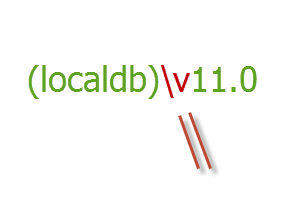
I have always had a problem remembering forward slash vs. back slash. Here’s a blog post from 2006 as evidence! So connecting to localdb is always a challenge because you specify it as (localdb)\v11.0.

My little secret to get the back slash correct is visual:

image

I know it’s totally dorky, but I just make sure that the slash is parallel to the first part of the “v”.  Hey, it works for me, what can I say? 🙂