April Conferences Where I’ll be Teaching, Plus a Workshop

I’ve enjoyed staying home in Vermont for most of 2012 but the wanderlust is setting in. I’m scheduled to speak at two conferences in April:

DevIntersection April 8-12, Las Vegas

I’ll be doing 3 talks at this conference, but am not exactly sure which ones will be selected yet. And yes, there will be some entity framework involved. 🙂 This is going to be a great conference and I’m excited to be included in a great lineup of speakers!

Database Days, April 17-19 in Baden Switzerland

*Full Day Workshop April 17th : Hard Core Entity Framework for Enterprise Developers
During the conference proper, I’ll do two talks:
*One for developers: Entity Framework Code First Migrations
*One for DBAs: Entity Framework & Your Database: Not as Evil as You May Think

While at Database Days, I’m looking forward to seeing Baden, a beautiful and historic town.

My new rig (aka a development box for a geek who is not a hardware nerd)

This fall I got myself a new development computer. I did my usual indecisive Libra thing over for months before settling on something.

My last machine was one that I got arm-twisted into building myself. I’m just not made for this. It should have been obvious when the parts list I selected from Newegg did not include a processor. When the parts arrived they sat in their boxes for 6 weeks. When I finally put it together it took me over 8 hours. And it never worked right. Ever. Even though I spent a lot of time over the next two years trying to figure out and fix it’s problems.

For this NEW machine, I gave it the old college try, having learned from my earlier experience and came up with a parts list that someone kindly pointed out had a motherboard and a case that were incompatible. I made many lists over the course of 4 weeks.

Finally another geek friend told me what I wanted to hear …just get a Dell and be done with it. That’s what I have normally done. This time I did buy it with an advance plan to customize it a bit. So here’s what I did.

I started with a Dell Optiplex 9010. It is a good workhorse for development.

That has an eco-friendly option of a low powered power supply which I was happy to select. I also went for the mini-tower which gave me enough flexibility to add in an extra drive.

The specs I chose were:

  • Processor: 3rd Gen Intel Core i7-3770 Processor (8MB, 3.4GHz)
  • Memory: 4GB
  • Graphics Card : (Proprietary) 1GB AMD RADEON HD 7570 without Adapters (supports 1 DVI and 1 Display Port)
  • Drive: 1TB SATA 
  • O/S: Windows 7 Professional,No Media, 64-bit
  • DVD: 16X DVD+/-RW SATA, Data Only, OptiPlex 901
  • No mouse, no keyboard, no monitor

Thanks to whatever deals were available at the time, this ended up costing $1050 plus tax and free shipping.

At the same time I ordered from elsewhere:

  • Crucial C4 256 SSD drive (2.5” with adapter)
  • Western Digital 2 TB Green Drive (not quite as fast as their Velociraptor but uses less energy :)) 3.5”
  • 12 GB RAM from Crucial

I also ended up needing:

  • a DVI to Display Port adapter for my 2nd monitor (I ended up with this)
  • an extra hard drive tray – proprietary to Dell and specifically made for that model. I should have ordered it with the computer! (for an extra $9 rather than $25 from dell after the fact or trolling ebay)

Putting it all together:

  • I took out the 1TB drive and it’s still on my shelf but will go to good use.
  • I installed the SSD as my O/S drive and the 2TB drive as a secondary drive.
  • I installed WIndows 8 pro on the ssd and split it in half. So 128 for the c: and 128 for d: which will be critical data that I use a lot. The rest of my stuff is on the 2 TB drive.

Note that this is not where I store things like photos and videos. This is just my development machine. I also have a laptop for email, writing, etc and a have an in house NAS that I use for storage and sharing.

  • I also installed the extra RAM so I have 16 GB.
  • I have two DVI monitors plugged into this machine. One is plugged into the DVI port on the graphics card and the other into the display port on the same graphics card (via the DVI to DP adapter I bought).

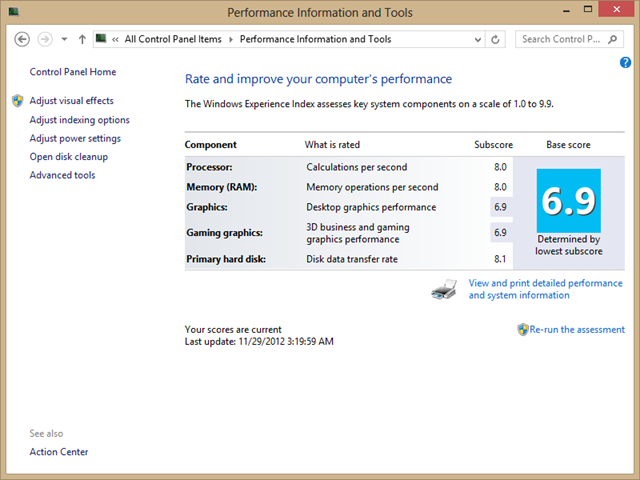
The performance is great (if you ignore the graphics which are more than sufficient for my needs).

image

And it’s very quiet which is important because I record screencasts for Pluralsight.com. So quiet in fact that I started getting bothered by the clock ticking on the wall and had to move it!

Where I notice the difference in speed on this machine is when I’m rendering videos in Camtasia. I imagine some of this may be due to the fact that it’s also a new version of Camtasia, but the videos render SO fast. What used to take about 45 minutes now takes about 2 minutes. I’m sure that the RAM, the processor and the SSD all contribute to that.

So I’m happy with this and have been using it for a few months now and just wanted to share in case anyone is in my boat — which is that I am NOT a hardware nerd and don’t have it in me to become one. And it did not cost me an arm and a leg. All told it was under $1500 which is relatively inexpensive for what I ended up with. Also, I need to consider that this is one of the few monetary investments I have to make for my business once every few years which makes it a bargain!

Sweating over all of the options will be the death of me some day. Thanks to the super-sensible Ryan Christensen-Schwarz (@mamanze) for talking sense into me. He was the one who said “oh just get a Dell”.

Beware machine.config files messing up Code First provider factories

It took us a long time and a bit of luck to get to the bottom of this problem. It turns out that at two completely different client sites they had computers whose machine.config file had been affected in a way that was causing an error in Code First.

The error that was being thrown at runtime was:

“Unable to determine the provider name for connection of type ‘System.Data.SqlClient.SqlConnection’”

Yet the database was reachable from ADO.NET code in the app that used the same connection string.

This led us down a lot of exploration of the provider settings in the web.config file.

Finally a clever developer at the client site wrote a little debugging tool that helped us see the *true* error which helped him get to the bottom of the problem.

The real error was:

"’DbProviderFactories’ section can only appear once per config file error’"

And it turned out that the machine.config had extra DbProviderFactories sections in it’s system.data element.

We are still trying to figure out what may have created this problem in machine.config but in the meantime, I’m trying to create some searchable text to help the next person who hits this problem.

I’ve ensured that the EF team is already aware of the problem.

Here is the MSDN forum thread related to this problem along with the solution:

Unable to determine the provider name for connection of type ‘System.Data.SqlClient.SqlConnection’.

Digging in to Multi-Tenant Migrations with EF6 Alpha

I wanted to give the new Multi-Tenant migration feature in the EF6 alpha (released Oct 30, 2012) a whirl and having done so, thought I would save someone a few steps figuring it out. The specs are very useful and thankfully I’m fairly familiar with migrations already so I didn’t have much difficulty getting it to work.

First, Some Caveats and Explanations

I’d like to start with a few caveats though. And for those of you who aren’t familiar with multi-tenant databases, a very brief explanation.

A multi-tenant database is able to isolate different groups of tables that are to be used for different purposes – most typically different applications. One method of doing this is commonly done with schemas e.g.: [JuliesApp].Customers, [JuliesApp].Addresses, [JuliesApp].Employees, [FransApp].SoftwareProducts, [FransApp].SoftwareVersions, [FransApp].Customers. (Note that those are [Schema].TableName, not just table names with a period in the middle.) I’ve got clients with databases that use multi-tenancy, so I am very interested in this feature.

Adding in Ido’s explanation from the comments(since there are multiple ways people use MT databases)

"hosting multiple clients on the same database-application server pair thus reduce overhead of deployment, maintenance, cost and some others."

Here’s an article on MSDN that’s much more authoritative on the topic of what & why than I can ever be.  Multi-Tenant Data Architecture

Up through EF5, Code First lets you specify a schema for each entity mapping using the ToTable/[Table()] configuration where you could add a schema name along with the table name. This required explicitly setting the table each time. Now with EF6, you can specify a schema per model in the OnModelCreate override with ModelBuilder.HasDefaultSchema(“People”). So if you are defining your models to represent a multi-tenant database, it is now simpler to specify the schema for all of the tables that are mapped to by your model’s entities.

Here is where I want to make first caveat. I’ve been talking and writing a lot lately about DDD Bounded Contexts and having multiple models in your domain. With my Bounded Context models, there can be a lot of overlap in mappings to the database. This is not where I would use HasDefaultSchema. With the pattern for creating multiple models for Bounded Contexts in a single app, I have also suggested a single context to be used for all database initialization. I’m not going to go into more detail on that but I just wanted to be sure that those of you who have seen my Pluralsight course, Entity Framework in the Enterprise, or my January 2013 MSDN Data Points column — if you are reading this after that’s been published — not to mistake my mention of “multiple models for multi-tenancy” for “multiple models for Bounded Contexts”.

Once you’ve defined various schemas, in EF5 and earlier, Code First migrations does not support this multi-tenancy. That’s changed in EF6. The team has added in the ability to create and execute migrations per model. And in order to do so they’ve changed some of the workflow for the metadata history tracked by the database. This feature is already available in the early EF6 alpha that was released at the end of October. You can read the specs on the EF CodePlex site.


rowan_mtd


Here is the second caveat. If you have seen Rowan Miller’s blog post about multi-tenancy with EF 4.1 Code First, that is focused on a particular scenario—repeating the same model in a database with different schemas. Here’s a screenshot from his blog post that explains what I mean:

I actually spent quite a lot of time with the new migrations feature to try to follow this path and since it’s an edge case, it’s not (yet?) readily supported. I eventually found a way to do it but it was pretty convoluted and I won’t bother sharing it here.


Trying out the Feature: First we need an M-T Database


I’m starting with two simple solutions where I’ve already defined my classes, model and a little console app to exercise them. They will both use the same database.

 image   image

The Models:

public class HotelRoomsModel : DbContext
{
  public DbSet<Hotel> Hotels { get; set; }
  public DbSet<Room> Rooms { get; set; }
  protected override void OnModelCreating(DbModelBuilder modelBuilder)
  {
    modelBuilder.HasDefaultSchema("Hotel");
    base.OnModelCreating(modelBuilder);
  }
}

 public class CasinoSlotsModel : DbContext
 {
   public DbSet<Casino> Casinos { get; set; }
   public DbSet<SlotMachine> SlotMachines { get; set; }
   public DbSet<PokerTable> PokerTables { get; set; }
   protected override void OnModelCreating(DbModelBuilder modelBuilder)
   {
     modelBuilder.HasDefaultSchema("Casino");
     base.OnModelCreating(modelBuilder);
   }
 }

Now I’ll initialize the model in the Casino app with some simple code:

  using (var context = new CasinoSlotsModel())
  {
    context.Database.Initialize(force: true);
  }

And my database gets created.

image


If I initialize the second model using similar code in the HotelApp, I get a second database: DataLayer.HotelRoomsModel. Not what I wanted. That’s because I’m using defaults.

Point Both Models to the Same Database

I need to use one of the many ways to direct both models to the same database. I’ll keep it simple for now and do that in the constructor for both model classes.

 public class HotelRoomsModel : DbContext
 {
   public HotelRoomsModel(): base("CasinoHotels")
   {      }

 public class CasinoSlotsModel : DbContext
 {
   public CasinoSlotsModel():base("CasinoHotels")
   {    }


Now I’ll initialize both models again.

image

Just what I wanted! Notice that I am using the default initialization still which for Code First is CreateDatabaseIfNotExists. I have not switched to migrations yet. So when it initialized the first model, no problem..there was no database yet so it created it. When it initialized the second model, the database already existed, but EF6 understood what to do since it was a separate tenant in the database.

If I had a type called Room in my Casino app, I’d also have a Casino.Rooms table in the database. The two apps know which tables are theirs so it doesn’t pose a problem.

Notice also that under System.Tables, I have some new tables that Code First uses to track the metadata from both app – or really for both schemas:

image

This is an important change in EF6.


Modifying something in the model and Initializing again – A Surprise

There are many ways to modify a model. You can add another DbSet to the model. You can change one of the classes that the model exposes. You can modify how the classes map to the database. I’ll do a quick mod – add a property to the Room class in the Hotel app. If I run the intialization again, EF should see that the model is already represented in the database, but in it’s former definition. Because I’ve changed the model, I anticipate that EF will suggest that I use migrations along with the big fat exception it will throw. (This is just how it’s been since EF 4.3.) But it didn’t! It just initalized happily without reporting a problem and the new property is completely ignored by Code First. That will end up with a runtime surprise down the road when I try to query or update using the new property.

I did some experiments to verify that the HasDefaultSchema is responsible for this. I should probably look to see if this is logged in Issues yet. 🙂

Update 11/19: Andrew Peters from the EF team confirmed the problem and has added this work item to correct it.

Enabling Migrations for *both* tenant apps

I’ll just skip ahead and switch to migrations anyway. If you’ve used migrations this will be familiar; but there are a few twists.

I have two projects with their own models in the, so I need to enable migrations in both projects.

In the package manager console window of each solution, I’ll enable migrations for the project with models in them:

PM>enable-migrations -ProjectName:DataLayer.CasinoModel -MigrationsDirectory:CasinoMigrations 
PM>enable-migrations -ProjectName:DataLayer.HotelModel -MigrationsDirectory:HotelMigrations 

Since I don’t have multiple models in a single project (I recommend against doing that anyway), I don’t believe that I really need to use the new MigrationsDirectory parameter. But I’m trying out the new features so in it goes! What this does is name the folder with the name I provided (e.g. CasinoMigrationsl or HotelMigrations) instead of just “Migrations”.

image       image 

It also adds the MigrationsDirectory setting in the Configuration class. You can read more about MigrationsDirectory in the specs.

    public Configuration()
    {
      AutomaticMigrationsEnabled = false;
      MigrationsDirectory = @"CasinoMigrations";
    }

A Configuration Kludge that May only be needed because of a Bug in the Alpha Bits

When the CreateDatabaseIfNotExists default initializer created the database, it created one MigrationHistory table for each model I was tracking. Those tables contain a [new to EF6] field called ContextKey. By default, Code First uses the strongly-typed name of the context for that ContextKey value in each row added to the table. When I switched to Migrations, it was looking for a context key of the schema name (that seems to be expected behavior). However, my interpretation of the specs was that Code First would be able to deal with this change, but it didn’t seem to be. Not finding a MigrationHistory table that contained any rows with “Hotel” as the context key, Migrations tried to create a new Hotel._MigrationHistory table. That failed because it already existed. My workaround (for now) was to explicitly set the context key to use the old default.

    public Configuration()
    {
      AutomaticMigrationsEnabled = false;
      MigrationsDirectory = @"HotelMigrations";
      ContextKey = "DataLayer.HotelRoomsModel";
    }

I did the same for the Casino Migration Configuration file setting ContextKey to “DataLayer.CasinoSlotsModel”.

I don’t know if I misunderstood what I read in the specs or if there’s a bug. So I’ll keep an eye on that one with further releases.

Update 11/19: Andrew Peters from the EF team has confirmed this problem and created this work item to fix it.

Use Code-Based Migrations, not Automatic

I set AutomaticMigrationsEnabled=true (and told Code First I was using the Migrations Initializer) for the HotelRoomsModel to see what would happen as a result of adding a new property to the Room class. I got the following error message when I tried to initialize the context for that model.

 image

So you need to explicitly create and execute migrations for each model as needed in the Package Manager Console Window.

Let’s see how that goes. Remember I’ve added a new property to the Room class since I initialized the database.

PM> add-migration NewPropertyInRoomType -ProjectName:DataLayer.HotelModel 

This creates a new migration named “NewPropertyInRoomType” for my HotelModel project.

image

And the migration recognized the correct change to the model:

  public partial class NewPropertyInRoomType : DbMigration
  {
    public override void Up()
    {
      AddColumn("Hotel.Rooms", "FirstNewPropertyWithMigrations", c => c.String());
    }
        
    public override void Down()
    {
      DropColumn("Hotel.Rooms", "FirstNewPropertyWithMigrations");
    }
  }

Now I have to explicitly execute this using update-database but making sure again that the command is executed for my HotelModel project. (FWIW, the PackageManager Console windows has a drop down to select the appropriate project to execute each command in but I’ve found that I prefer to just do that in code rather than in the UI.)

PM> update-database -ProjectName:DataLayer.HotelModel  -verbose

I like to use –verbose so I can see what’s happening. 🙂

I’ve got the new property in my database table now.

image

Additionally, I can see that the migration and representation of the current model were added as a new row into the correct MigrationHistory table: Hotel.__MigrationHistory.

image

I’m satisfied for now. I actually spent a long time on this because I hit walls, had to back up, explore different behavior, go back and read the specs repeatedly, etc. But hey, a girl’s gotta have some fun, right? 🙂 (yes this is indeed fun for me…when I have a little free time on my hands. 🙂 )

Check it Out Yourself and Give Feedback to the Team

So if you are interested in multi-tenant database support, please check out the feature and provide feedback either in the Issues or the Specs page for this feature. This is an early alpha and you can help shape how it works when EF6 releases.

*Thanks to Frans Bouma for pointing out that I hadn’t clearly divided this into two app on my first pass. I took the post off-line for about 1/2 hour to make the revision.
Making your way around the Open Source Entity Framework CodePlex Site

I haven’t spent a lot of time on CodePlex until EF got there. So between learning my way around CodePlex and also how the EF team is organizing all of their information, I kept missing key information because I didn’t know where it was tucked away. So I thought I would list what I think are the most important bits in one spot.


1. The main page is at entityframework.codeplex.com.

2. The Roadmap gives a very broad overview of plans for EF.

Currently that lists:

  1. Async support
  2. Stored Proc and Function support for Code First and
  3. Custom Code First Conventions

3. The Specifications provides a list of features that the team is working on and each one links to detailed specs for those items.

Currently the EF6 specs show a more comprehensive list. All but the tooling consolidation have made it into the alpha, though it’s *alpha* so nothing is set in stone yet.

  • Task-based Asynchronous Pattern support in EF
  • Tooling Consolidation
  • Multi-tenant Migrations
  • EF Dependency Resolution
  • Code-based Configuration
  • Migrations History Table Customization
  • Custom Code First Conventions

The list currently doesn’t include the Stored Procs & Function support for Code First but those are definitely coming in EF6. This is confirmed in comments of the team’s blog post announcing the EF6 Alpha.

Each item on the list links to the specs for the item which provide some really good detail. You can also add comments here.

4. Design Meeting Notes

Got some free time to sate your curiosity? From what I see on the site these are posted every other week and are very extensive and well organized.

5. Discussions

This is one of the places where you can get very involved and influence the path that EF6 (and beyond) is taking. It is specifically for talking about the open source code base that’s on CodePlex . There are already a lot of very interesting discussions happening. For example, developers working with the team thinking through batch insert support.

There are 4 areas for discussions:

  • EF Designer
  • EF Power Tools
  • EF Runtime
  • General

6. Issues

This is where we can provide feedback on things that we’d like to see implemented or problems that need to get fixed. CodePlex provides a great way to filter issues. Go check out what’s there. Vote on things that are important to you. Provide additional feedback.

7. Code Code and more Code

One of the coolest parts about EF being open source is that you can download the source code. There are nightly builds you can play with. You can fork them if you want. But the absolutely best part is that if you’ve worked something out (perhaps you picked an issue to solve or are pursuing your own awesome idea) you can submit it to be included into the code base.

8. The changeset history on the source code area is fun to look through with details about each commit being made to the source.


This list should get you well on your way to keeping up with what’s going on and hopefully being inspired to contribute ideas, discussion and code to Entity Framework!

Recent Interviews & Articles & Videos

Being the lazy gal that I am, I tend to put this info on twitter which is just a passing note, to be forgotten within a day. So I thought I’d collect some of this recent content in one place.

Recent Interviews

Pluralsight does these short interviewes whenever we publish a new course. So this one is for the 3+ hr course I published in September.

This was a fun interview recorded live when I visited the Dot Net Rocks Road Trip in Atlanta on Oct 22.

This is a regular DotNetRocks interview recorded this summer.

Recent Articles

This article provides an overview of what’s new in EF5, from performance improvements to enum support and enhancements to the designer. I think the editors gave the article an unfortunate name.

Upcoming Articles

  • December MSDN Magazine: “Data Points: Pain-Free Data Access in JavaScript—Yes, JavaScript”
  • January 2013 MSDN Magazine: “Data Points: Shrink EF Models with DDD Bounded Contexts”

Recent Videos

Covers implementing Domain Driven Design Bounded Contexts with EF, Repositories & Unit of Work and Automated Testing. The video requires a Pluralsight subscription.

Easy Move for Outlook when Replacing Office 2013 Preview with RTM

I just downloaded Office 2013 Pro Plus from MSDN to install on a machine that was running the preview. As this is a recently repaved computer, Office 2013 Preview was the only version of Office on the box. In prep, I sought out others’ reports on the web, but couldn’t find anything except a note somewhere (not from Microsoft) saying that you had to uninstall the Preview first.

I was hoping not to have to go through account set up, macros and other non PST file settings again and took a bunch of precautions such as backing up the relevant registry node and taking a few screenshots. It turns out that all of these precautions were unnecessary. Yay.

When I opened the new Outlook installation, it already had my accounts with PST files, my Quick Access shortcuts and my macros in place. So in that regard, it was as though I had just reopened the already set up Outlook Preview. I suppose that means that uninstalling the Preview did not remove the registry files with the settings. the only thing I had to reset so far was to make sure the calendar showed up on the To-Do bar.

WRT the settings still being on the computer after uninstalling, I had come across a blog post by a Microsoft MVP about cleaning up after an Office 2013 Preview uninstall which should be useful if you have no intention of replacing that with the RTM.

Other than that I haven’t see anything different in my quick look so far. I did read that you can change the color scheme.

There are two things that I was unhappy about (one much more than the other) with Preview which have not changed with RTM.

When you have the calendar in the To-Do bar it only displays events for the selected date. This is a change from Outlook 2010. I have grown very dependent on seeing upcoming calendar items listed there. I am not very habitual (to go look at the calendar) and I have bad short term memory. So having the next few days or week’s worth of calendar events in my face constantly (because I’m constantly in the email section of Outlook) was a great benefit for me. It would help me keep things in mind..from dentist appointments to client meetings. I a not sure how I will replace this without having to train myself to a new habit.

The only other annoyance so far is that you can’t drag emails onto that ToDo bar calendar to create calendar items from them. This was a realy nice feature. Now you have to go through a lot of steps to duplicate that task.

But it’s the price of moving forward and I’ll just learn to live with these and create new habits. But …arggh..and to other software developers…think about that when you consider removing features when creating new versions of software tools.

Oh and 3rd party Office developers? Call me, maybe?

Full Day Entity Framework Workshop Nov 2 at DevConnections

There’s still time to register for my post-conference workshop at DevConnections.

VPS301: Entity Framework in the Enterprise: A Day of Guidance for Avoiding and Solving the Big Problems
HANDS-ON, BRING YOUR OWN LAPTOP (9:00 AM – 4:00 PM)
Add’l Fee $425.00

Entity Framework’s default behaviors work wonderfully for demonstration or small applications. But once you start building large applications that will use EF in the data layer, you can quickly run into problems. Most often these are performance problems which can be the result of anything from poor data layer architecture to a simple misunderstanding of how EF works under the covers. EF guru Julie Lerman has been hired by many corporations to help developers and architects discover the causes and then fix underlying problems with how they are implementing Entity Framework. In this one day workshop, we’ll focus on some of the most common problems around architecture, scalability and performance that Julie has encountered while mentoring these development teams. You’ll learn what changes you can make in your apps to fix them as well as how to plan ahead when you are building new apps or moving legacy applications to Entity Framework.

The plan for this workshop is to be very interactive. Bring your problems, your laptops and even some code (that is okay for others to see). If you have a nasty performance issue that we could use to demonstrate getting to the source of the problem and provide suggestions for fixing it, contact Julie through her blog (http://thedatafarm.wpengine.com/blog/contact/) by October 15.

http://devconnections.com/shows/fall2012/workshops.aspx?s=190

New Entity Framework in the Enterprise Course on Pluralsight

Well..new as in published last month but I never blogged about it.

This is a 3hr16 minute course called “Entity Framework in the Enterprise”.

Learn how Entity Framework fits into your overall software solution when using enterprise level architecture. You’ll see how to implement DDD Bounded Contexts with EF, Repository and Unit of Work patterns and a variety of styles of automated testing. This course is applicable to apps built with V2010, EF4.1+ and .NET 4 as well as with VS2012, EF5 and .NET 4.5.

There are four modules.

1) Architecting the Data Layer (Overview)

2) Bounded DbContext

3) Repositories and Unit of Work

4) Automated Testing

Pluralsight put a 10-minute clip of this on YouTube and the blogged about it. The clip focuses on the Domain Driven Design Bounded Context pattern and how I’ll implement it with Entity Framework. Here is that clip.

The full course (which requires a subscription, but a month for $29 that gives you full access to the entire Pluralsight library is pretty cheap!) . Here’s the link to the course.

I now have 9 Entity Framework courses on Pluralsight which is almost 17 hours worth of content.

Enjoy!

Vermont Geeks Rejoice! So many awesome events packed into the near future!

Monday Sept 17th, Burlington: Northern Vermont SharePoint Users Group : “Cool Sh-t (SharePoint)"

Tuesday Sept 18th, Burlington: VT Functional Group: Eric Smith – Stepping Up to Haskell

Wednesday Sept 19th, Winooski: Vermont Technology Alliance Lunch & Learn (Topic: Innovation, Speed  & Risk)

Wednesday Sept 19th, Burlington: Burlington Ruby : Intro to Object Oriented Programming in Ruby

Friday Sept 21st, Burlington: The Windows 8 Game Dev Fest  (5pm – 10pm)

Saturday Sept 22nd, Burlington: Vermont Code Camp 4 (all day!)

Tuesday Sept 25th, Burlington: btvwag: Networking Refactored

Saturday Sept 29th: Shelburne: Champlain Maker Faire (all day)

Fri-Sat Oct 19-20: VTHack (24-hour hackathon with $10,000 in prizes)

Fri,Sat Oct 26 & 27: Vermont Tech Jam (Job Fair, Presentations & Panels, Networking)


Don’t forget the  Robots Rockets & Steampunk exhibit at Shelburne Museum through October 28th. Awesome geeky fun!


See the calendar on Vermont Coder’s Connection meetup site for new event listings!