Monthly Archives: August 2007

Careful with those lambdas, sonny

Well, sonny is me, actually.

I spent quite a long time trying to understand why my LINQ average function wasn’t working.

Paring down to a simple example, I wanted to check the average of a filtered subset of data.

Say my data is an array if integers:

int[] nums = { 84, 123, 101, 94, 238 };

I can get the average of these by calling:

var numavg=nums.Average();  –returns 128.0

I then wanted to get the average of only those numbers that were greater than 100.

But wait, I really started this in VB! So I was writing this function:

Dim avgnums = mynums.Average(Function(n) n > 100)

Which compiled and ran, but returned -0.333333333333.

I looked at it inside and out, over and under and could not figure out what was going on.

so then I tried it in C# and got this compiler error:

Cannot convert lambda expression to delegate type ‘System.Func<int,int>’ because some of the return types in the block are not implicitly convertible to the delegate return type 

Finally I noticed the other error listed in the Errors window:

Cannot implicitly convert type ‘bool’ to ‘int’

And realized the error of my ways.

I was thinking that my lambda was for filtering, but all I was doing was an eval which was returning trues and falses depending on whether the value was >100 or not. And the average function was the same as Average(0,0,0,0,-1,-1) which is -2/6. So -0.333333333 was correct!

[note – Option Strict was off which imacted this – see additional comments at the end of this post]

So what is the correct way to do what I wanted? I need a filtering method, duh!

in C#:

var numavg3 = nums.Where(q => q > 100).Average();

in VB

Dim avgnums2 = mynums.Where(Function(n) n > 100).Average(Function(n) n)

About VB’s Option Strict in this example

As Bill McCarthy points out, Option Strict=On would have caught the attempt to use a boolean in the Average function, forcing me to specifiy the types in the array, which I *had* in fact done in the C# code, (because it forced me to). Option Strict is one of those things you need to change to “ON” after you install Visual Studio. I had missed it in this installation and because I was focused on what I was doing wrong with the lambdas, it hadn’t even occurred to me.

Dim mynums() As Integer = {10, 20, 40, 100, 120, 140}

Otherwise, he compiler tells you: “Option Strict on requires all variable declarations to have an ‘As’ clause.” Which is a lie. There are cases where it is required and cases where it is not. Note my VB code for calculating the average is still valid and avgnums2 is recognized as a Double at compile time.

On the other hand, VB’s implicit casting is still in play as is demonstrated by then taking that double and concatenating it with a string.

 Dim x = avgnums2 & “xya”

Knocking off Danny Simmons Entity Framework Beta 2 List: #2: Span

[#1: Complex Types]

The next item in Danny’s list that I wanted to look at was this:

·         Better support for span over LINQ to Entities queries

The span feature makes it possible to pre-fetch related entities.  In previous CTPs span was specified through a property on ObjectQuery<T>, but in this CTP span has been changed to work as a builder method, Include, which makes it simpler to specify span rules in LINQ to Entities queries.  Include can be called on the ObjectQuery used in the from clause of the LINQ query.

This is low-hanging fruit for me because I had seen the use of SPAN in March and tried it out when it was released with the June CTP. Here is the blog post I wrote at that time.

The use of span changed a lot since then. In fact, the word “span” no longer exists!

Previously you had to tell the object context that you wanted to include child data before you actually ran the query. Now you include that instruction in the query itself by attaching the Include property to the object in the query like this query which says to grab the SalesorderHeader info along with the customers.

 Dim custQuery = From cust In aw.Customer.Include(“SalesOrderHeader”)_
 Where cust.SalesPerson = “adventure-works\jae0” Select cust
  For Each c In custQuery
   Debug.Print(c.CompanyName & “…………..”)
   For Each so In c.SalesOrderHeader
    Debug.Print(so.OrderDate)
   Next
  Next

You could also drill in further

   Dim custQuery = From cust In aw.Customer.Include(“SalesOrderHeader.SalesOrderDetail”) _
   Where cust.SalesPerson = “adventure-works\jae0” Select cust
   For Each c In custQuery
    Debug.Print(c.CompanyName & “…………..”)
     For Each so In c.SalesOrderHeader
       Debug.Print(so.OrderDate)
           For  Each sd In so.SalesOrderDetail
              Debug.Print(“…” & sd.OrderQty)
          Next
       Next
    Next

This would get the headers and their child detail records.

You can also define multiple collection properties to grab such as here where I get the salesOrderHeaders and the Addresses for the customer. Looking at how to get at the addresses makes me really happy to have entity framework and the associations doing this job. What a pain in the rear the joins would be otherwise!

  Dim custQuery = From cust In aw.Customer.Include(“SalesOrderHeader”).Include(“CustomerAddress.Address”) _
   Where cust.SalesPerson = “adventure-works\jae0” Select cust
  For Each c In custQuery
   ‘c.SalesOrderHeader.Load()
   Debug.Print(c.CompanyName & “…………..”)
   For Each so In c.SalesOrderHeader
    Debug.Print(so.OrderDate)
   Next
   For Each add In c.CustomerAddress
    Debug.Print(“Cust City: ” & add.Address.City)
   Next
  Next

Outputs:

Action Bicycle Specialists…………..
6/1/2004
Cust City: Woolston
Central Bicycle Specialists…………..
6/1/2004
Cust City: Maidenhead
Downhill Bicycle Specialists…………..
Cust City: Berks
Metropolitan Bicycle Supply…………..
6/1/2004
Cust City: London

I looked to see if you could skip a generation eg aw.Customer.Include(“SalesOrderDetail”), but that didn’t pan out. Makes sense, but it only took an extra 5 seconds to be sure.

The nice thing is that include is now explicitly tied to the objectQuery it is used in. No more resetting the object context.

So if you want to do another similar query, you won’t get the related data unless you ask for it. Getting what you ask for is part of the mantra of Entity Framework. No assumptions are made.

Dim custQuery = From cust In aw.Customer.Include(“SalesOrderHeader”) _
   Where cust.SalesPerson = “adventure-works\jae0” Select cust

 Dim custQuery2 = From cust In aw.Customer _
    Where cust.SalesPerson = “adventure-works\shu0” Select cust

The 2nd query will only bring back customer data. If you want SalesOrderHeaders, you will need to explicitly load them as you iterate through the customers.

For Each c In custQuery2
   c.SalesOrderHeader.Load()
   Debug.Print(c.CompanyName & “…………..”)
   For Each so In c.SalesOrderHeader
    Debug.Print(so.OrderDate)
   Next
  Next

Knocking off Danny Simmons Entity Framework Beta 2 List: #1: Complex Types

I saw complex types in the March CTP of Entity Framework and tried to implement them but found out the hard way that the functionality wasn’t fully implemented. Here’s the forum thread from that time.

So Complex Types were the first thing I wanted to try out on Danny’s list of what’s new in Beta 2. Complex types can only be used as properties of other entities. They have no keys and can only have a one to one relationship with the main entity.

Here is his description:

Complex types “Complex types” is the Entity Framework name for value properties which have more intricate structure than scalars.  The canonical example is an Address type which contains several parts (street, city, state, etc.)  Complex types are somewhat like entities except that they do not have any identity of their own (they are value types).  This means that a complex type instance is always a part of some other enclosing entity—it can’t stand on its own, it doesn’t have relationships, etc.  In this release, the mapping scenarios for complex types are significantly limited: inheritance is not supported, complex type properties cannot be null and they can only occur in single instances, not collections.

I am using the Adventureworks LT database, which can be found on the CodePlex site for SQL Server Product Samples.

I modified the entity for SalesOrderHeader taking the ShipDate and ShipMethod properties and putting them into their own complex type.  I had to do this manually in the XML. There’s no support for it currently in the Designer.

   <ComplexType Name=”ShipmentDetails”>
     <Property Name=”ShipMethod” Type=”String” Nullable=”false” MaxLength=”50″ />
     <Property Name=”ShipDate” Type=”DateTime” />
    </ComplexType>

Then the SalesOrderHeader needs a property to hook up to the ShipmentDetails.

     <Property Name=”Shipment” Type=”Self.ShipmentDetails” Nullable=”false” />

Next I modified the mapping so that it could find the properties in their new spot.

This mean moving the ScalarProperties for those fields into a ComplexProperty. Note that the ComplexProperty is a sibling of the other ScalarProperties inside of the MappingFragment.

        <ComplexProperty Name=”Shipment” TypeName=”AWModel.ShipmentDetails”>
         <ScalarProperty Name=”ShipMethod” ColumnName=”ShipMethod”/>
         <ScalarProperty Name=”ShipDate” ColumnName=”ShipDate” />
        </ComplexProperty>

The ComplexProperty Name points to the name of the property in the entity and the typename, which has a reference to the namespace of the Conceptual Layer, points to the ComplexType that I created.

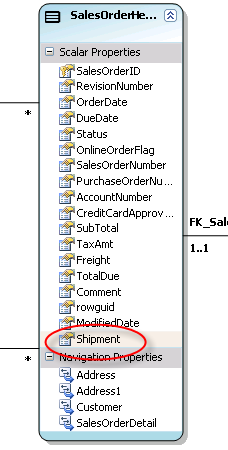
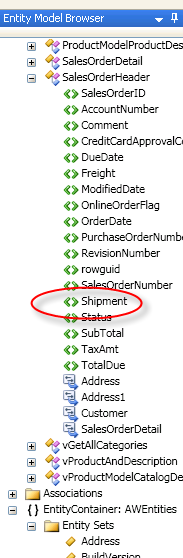
The complex type does not get surfaced in the current version of the designer or in the browser. All you can see is the shipment property and it has no Type defined.


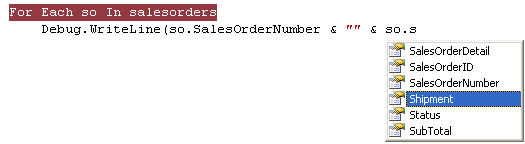
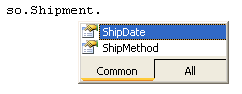
But it is well represented in the class that is generated and available in code with help from intellisense:

In the end, I thought something was wrong because all of the ShipDates and ShipMethods were the same, but it turned out that this is what the raw data looks like in the sample database. So I changed some of the data and ran it again to be sure.

Now when I have entities with a lot of properties, I can make them more organized and readable with complex types. Since the designer is only the CTP1, I’m giving them the benefit of the doubt that I’ll see the complex type in the designer eventually.

Note: The complex type came through like a champ when I returned SalesOrderHeaders from a web service.

First look at the Entity Framework Designer

The first thing I wanted to look at after I downloaded the new Entity Framework Beta2 and Tools CTP was the EDM Designer.

The designer is displayed as the result of opening up an EDMX file. The EDMX file is the wrapper for the three Entity Data Model files (CDSL, MSL, SSDL). Therefore, you need to create a new EDM, either from a database or a blank EDM.

For the sake of familiarity, I created one based on the Northwind database and when asked, I selected all tables, all views and all stored procedures to be part of my model.

When the wizard finished it’s job, I saw this in the output window.


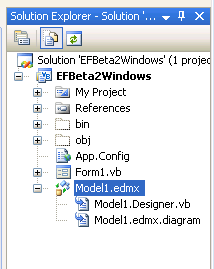
The new EDMX file was displayed in my solution, but I don’t see the xml files any more in the solution explorer. Opening up the EDMX file in an XML tool (rather than the default designer) I see that this contains what used to be the SSDL, the CSDL and the MSL file.

But I’ll worry about that a little later. It was time to double click on the EDMX file and see the designer!

Not only was the conceptual model laid out as expected, but there is an explorer as well where you can drill into the conceptual model and it’s entities and association sets. You can also  drill into the Storage layer.

I noticed these warnings, but if you look closely, they are just saying that the model is not able to create keys for the stored procedures so they’ll be read only. These particular sprocs are just queries for viewing, so that’s fine.

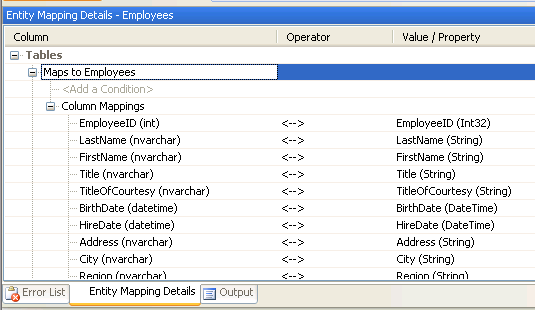
If you select an entity in the designer, you can see it’s mapping to the store model in the output window below.

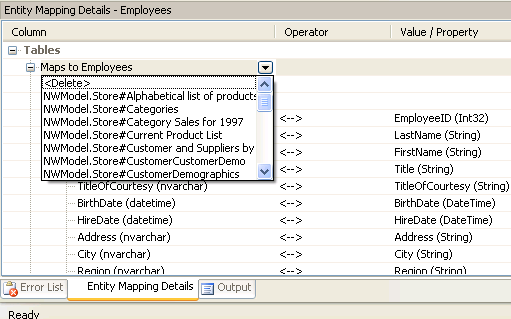
This is also where you can create mappings. See how you can drop down and select other tables and views from the storage model. The Value/property items are also dropdowns for mapping.

What I didn’t see anywhere is a visual designer for the storage model or for visually mapping between the two.

I know in a screencast from (was it) February (?), the storage layer was not only part of the designer, but malleable. Perhaps we’ll see that in a future CTP.

Clicking around in the designer, you’ll find a context menu also. Here’s a function for exporting the diagram.

And playing around in the explorer you can see tooltips of the xml that represents the various bits and pieces of the schemas.

One thing I have been struggling with since the June CTP came out was stored procedures. There is finally an example that appeared in the forums today and also in the help file that came with the Beta2.

Since the designer is now the default for opening up the edmx, I need to right click on it in Solution Explorer and open with the XML Editor instead. It will be interesting to watch the cause and effect as I work from both ends now.

Specifying named types in LINQ Queries

I was looking at a LINQ Query that I wrote when I was first exploring LINQ in depth at the beginning of the year.

This example was to see how to create a named anonymous type like this:

Dim query= From s In nw.Suppliers _
    Order By s.CompanyName _
    Select Supp = New With {s.CompanyName, s.Country, s.Products}

Looking at it today though I could not see what creating a name (Supp) for the new anonymous type was buying me in this particular case.

Its results were no different than

Dim query = From s In nw.Suppliers _
 Order By s.CompanyName _
 Select s.CompanyName, s.Country, s.Products

And whether I iterate through the results or bind them to a data control, there’s no still no difference.

So I wanted to make sure i was clear on when naming the anonymous type was beneficial.

One great example is in the (dog-eared by now) LINQ article that Anders Hejlsberg and Don Box wrote in February where the LINQ query results in objects with child objects. I’ve used the idea behind their couple/wife/husband example to create my own query where I combine data into new types.

For example, this query lets me create a type from some product data with a new sub-type (anonymous) of SupplierHighlights. The sub-type has only the properties Name and Country.

Dim MyQuery = From p In db.Products _
Select p.ProductName, p.QuantityPerUnit, _
SupplierHighlights = New With {.Name = p.Supplier.CompanyName, .Country = p.Supplier.Country}

Then I can access the new type and sub-type data because the subtype has a name.

For Each q In MyQuery
     Console.WriteLine(“Prod Name: {0},Quantity Per Unit: {1}, Supplier: {2}, Country: {3}”, q.ProductName, q.QuantityPerUnit, q.SupplierHighlights.Name, q.SupplierHighlights.Country)
    Next

Sure, I could have just created properties called SupplierName and SupplierCountry, but having the child type SupplierHighlights not only makes me more organized, but gives me the ability to do further queries if I wanted to get all of the supplier info out of the product query. This is why I am considering SupplierHighlights to be a type rather than just a property within a complex type and I should point out that I could be incorrect in calling it a type, but will stick to it until I find better evidence that it’s not. Because I have everything already grouped into a supplier type, I don’t have to list each of the fields (SupplierName, SupplierCountry), I can just query :

   Dim nextQuery = From prod In query Select prod.SupplierHighlights
    For Each s In nextQuery
     Debug.WriteLine(s.Name, s.Country)
    Next

So, here creating the named type (I really want to call it a named anonymous type. I wonder if that’s accurate?), it is really useful and necessary. Try creating the sub type without a name, and you’ll see what I mean!

Another place to leverage the named type SupplierHighlights is in databinding. I can databind directly to prod.SupplierHighlights and automatically get all of the columns. In databinding to the properties of the base query results (ProductName, QuantityPerUnit), I have to bind to “MyQuery”, so even if I had named that type, I don’t use that name anyway.

Also,  take a look at this post by Paul Vick about mutable and immutable anonmyous types in VB9.

(The italicized text are a result of feedback from Bill McCarthy, who is constantly (and generously) attempting to drag me down into the depths of complexity of VB.)

Erik Meier kinda compares LINQ to SQL to Entity Framework

I just came across this interview on the INFO-Q website. I like how they do this. Short questions and answers. Each q/a has a video clip, where you can watch and listen to the subject of the interview and simultaneously read the text of the question and answer. That makes it really easy for me to paste these two tidbits.

Basiically he says LINQ to SQL is for simple database scenarios and EDM (Entity Data Model) is for very complex schemas and giant databases. Not earthshatteringly different than what are figuring out, but interesting to hear it from the guy who is credited for inventing LINQ. He’s NOT comparing it to Entity Framework, since there’s more to Entity Framework than the EDM that lies at it’s core. Here is a post about Mike Pizzo comparing LINQ to SQL and Entity Framework directly.

What about DLINQ (aka LINQ to SQL)? 
DLINQ is and instance of LINQ over Relational Data, which is trying to address the simpler mapping scenarios. In DLINQ there are several ways to do this. You can point at your database and get your classes from the metadata and the database, you can put custom attributes on your classes, and define your mapping like that or you can use an external mapping file. DLINQ, like many other object relation mappings, has this notion of context, which is the bridge between the object world and the database world, that does the change tracking and holds the database context, and the transaction context and so on. Also this context will take your expression trees, translate them to SQL and then materialize your objects. DLINQ is one example of using LINQ to query against Relational Data.

Can you relate EDM into this discussion?
Yes, the EDM is designed for situations where you have really complicated schemas and giant databases, where your mapping scenarios are much more complex, where you want to do de-normalization, and where you want to map different tables to a single type or you want to have one table mapped to different types, or you have complicated implementations of inheritance. These are situations where you have really complicated enterprise applications, legacy applications, where simple direct one to one mapping doesn’t fit.
 
Also interesting to hear him talk about what he’s working now.

So many data access options, so little time!

At DevConnections this fall, I’m going to do a post-con, 1/2 day workshop to provide some guidance over which Data Access options in .NET 3.5 are right for you now that we have MORE choices coming out.

Do you use classic ADO.NET? LINQ to SQL? Entity Framework? And if Entity Framework, do you use Entity SQL? LINQ to Entities? Entity Client?

More options should be liberating, but at first glance, it’s a little daunting, which is why I am doing this session.

While the main conference will have a special Data Access track, and plenty of opportunities to learn about Entity Framework, LINQ to SQL and more, I think that a wrap-up session will be really helpful.

Because it’s a post-con, it’s an additional fee on top of the main conference – but only $199.

Be sure to check it out!

Dedicated Data Access track at DevConnections Las Vegas in November!

I’m very excited about the Data Access track at DevConnections this fall.

Generally, people don’t know what to do with data access sessions. Do they go into Visual Studio Connections? ASP Connections? SQL Server Connections? They belong everywhere! Whenever I’m submitting ADO.NEt talks for a conference I struggle with deciding which track to choose, because it belongs in most of them.

So we built a single track with nothing but Data Access talks and it’s a rock start line-up!

You’ll find the talks listed under the ASP Connections Sessions and the Visual Studio Connections Sessions (look for Microsoft Day Visual Studio section for the MS talks, and Data Access Track for the 3rd part speaker talks).

Thanks to all of the conference chairs, conference staff, speakers and folks on the Data Programmability Team at Microsoft who have helped bring this about.

Microsoft Day:

  • ADO.NET Entity Framework Designers
  • Data Modeling and Application Development with the ADO.NET Entity Framework and LINQ over Entities
  • Project Astoria: Data Services for the Web
  • Optimizing Online, Enabling Offline with SQL Server Compact and Sync Services for ADO.NET

Wed & Thursday

John Papa, author of the MSDN Magazine Data Points column

  • Unraveling the Entity Framework
  • Implementing the Entity Framework

Dino Esposito, All ’round .NET wizard

  • Typed DataSets, Linq-to-SQL, Linq-to-Entities: Data Design Patterns Do Matter

Don Kiely: Data & Security Guru

  • ADO.NET Performance Tips & Tricks

Kathleen Dollard: The Queen of CodeGen

  • ADO.NET Metadata and Code Generation

Bill Vaughn, The Legendary Bill Vaughn 🙂

  • ADO.NET Connecting

Dave Sussman, Author of many ADO.NET & ASP.NET Books

  • Black Belt Data Binding (in ASP.NET)

Alex Homer, Partner in crime to the many ADO.NET & ASP.NET Books with Dave Sussman

  • Five Favorite Features in ADO.NET and SQL Client

Julie Lerman (moi)

  • Real World Entity Framework (looking at 3-tier patterns)
  • ADO.NET 3.5 Data Access Guidance (post conference 1/2 day workshop: 9-12am, add’l fee)