All posts by Julie

Vermont IT Jobs: Dir of E-Commerce in Montpelier

http://www.fitsolutions.us/careers.html

Director of E-Commerce

Summary

Our Northern VT client is looking for a talented individual to direct the web strategy for their organization. This position will be responsible for setting the electronic commerce strategic direction as well as its execution.  This individual will also set web based marketing and communications directions and work with cross-functional teams to establish a best in class web experience for producers, customers and associates of the company.

Key Responsibilities

  • Work collaboratively with Marketing and Distribution to develop effective web based  marketing strategies to achieve performance results and overall objectives
  • Manage the overall customer experience on the web sites
  • Provide leadership and direction on merchandising and product positioning throughout the website.
  • Establishes and implements enterprise-wide web based business systems.
  • Manage the design and content development of web templates and other interactive promotions.
  • Directs technical strategy, design, construction and maintenance for platform websites.
  • Responsible for regulation and management of access rights of different users, appearance and development of website navigation.

Job Requirements

         Bachelor’s degree in Business, Marketing or related fields

         7 plus years experience in developing and managing e-commerce platforms

         In depth knowledge of contemporary web technology and how to apply it to business strategies

         Knowledge of financial insurance industry a plus

         Solid knowledge of e-commerce marketing and business principles with proven success in the development and implementation of online marketing strategies

         Proven ability to lead and influence both projects and teams.

For additional details or send resume to:  kcoffin@fitsolutions.us

Looking at EF4 CTP5 in Parts: Part 4–Working with New and Existing Databases in Code First

One of the neat features of Code First  in CTP5 for those who are starting from total scratch…no database at all.. is that there is default behavior for working with a database. You don’t even need a database connection string. If you do not specify a connection string anywhere …code or config…then Code First will make a presumption about the database.  THe default presumption is that the database is the same name as your context class and is a local SQL Server Express instance.

Here’s an example.

I’ve got a context class called AWEntities.

namespace CTP5_Modeling
{

  public partial class AWEntities : DbContext
  {
    public DbSet<Customer> Customers { get; set; }
    public DbSet<Product> Products { get; set; }
    public DbSet<Detail> Details { get; set; }
    public DbSet<Order> Orders { get; set; }
  }
}

When I instantiate that class:

var context = new AWEntities();

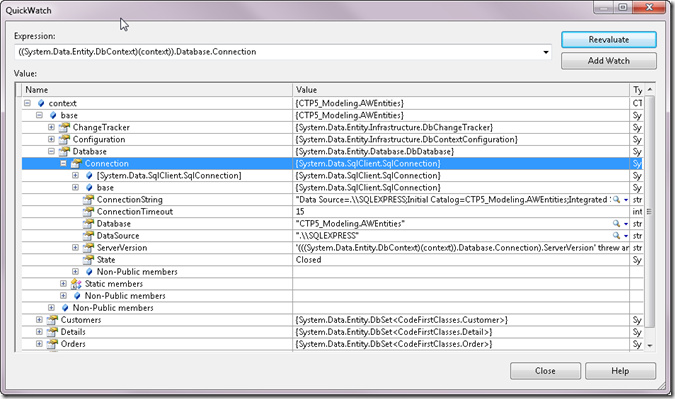
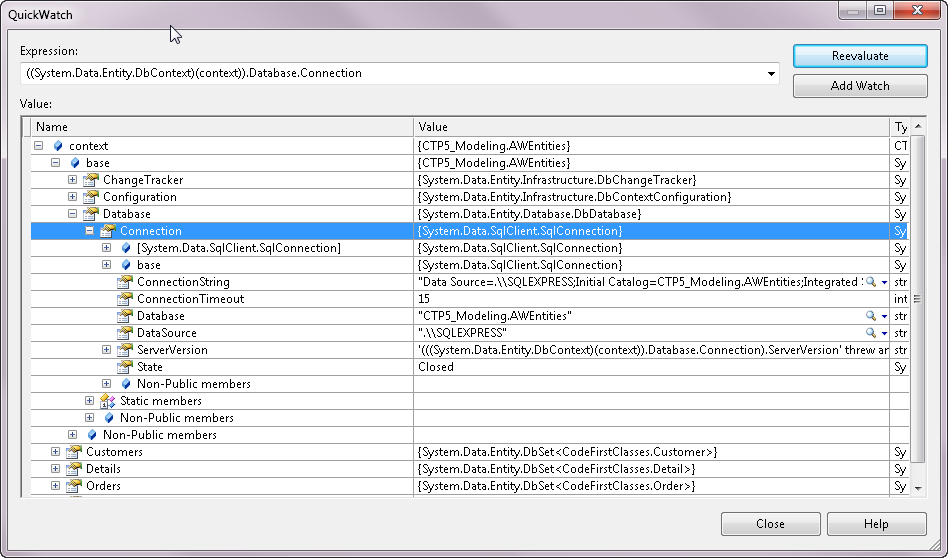
You can see, in this debugger screenshot of the context, the database connection string that is created when there is no other available:
defaultdatabase


It presumes the database has the name of the class’ namespace plus name, CTP5_Modeling.AWEntities and that it’s SQL Express.

If the database doesn’t already exist, it will create it for you.

dbcreated

And by default, any time you instantiate the context again, it will check to be sure that your code first classes still line up with the schema of that database.

If not, you’ll get an error like this:

modelchanged

Now what if you want your code first classes to work with an existing database.

Step #1, you’ll need your database connection string, of course. Not an EntityConnection  string, but a regular database connection string.

Just to be clear, here is a typical EntityConnection String:

<add name="AWEntities"
           connectionString="metadata=res://*/Model.csdl|res://*/Model.ssdl|res://*/Model.msl;
                                                  provider=System.Data.SqlClient;
                                                  provider connection string=&quot;Data Source=.;Initial Catalog=AdventureWorksSuperLT;
                                                                                                                         Integrated Security=True;MultipleActiveResultSets=True&quot;"
                                                  providerName="System.Data.EntityClient" />

With code first, there is no metadata and with not metatadata you won’t need the EntityClient provider.

Here is the connection string  that I’m using for the SQL Server instance of my database:

<add name="AWEntities"
            connectionString="Data Source=.;Initial Catalog=AdventureWorksSuperLT;
                                                    Integrated Security=True;MultipleActiveResultSets=True"
            providerName="System.Data.SqlClient"/>

There’s still one problem. The presumptions that code first will make at runtime about my database (based on my classes) don’t exactly match my database.

For example, I have a Customer class. Code first will presume that the database table has the same name as the EntitySet. The EntitySet will be specified on the fly at runtime by code first as the plural of the class name, e.g., Customers. However my database table name is customers.

I can fix that up with attributes from the using System.ComponentModel.DataAnnotations namespace:

[Table("Customer", SchemaName="SalesLT")]
public partial class Customer
{
}

Notice also that I’m specifying the schema. Otherwise it will default at dbo and my store query will fail when it tries to query against dbo.Customer.

Also, I have simplified names of some classes and some properties.

In the database, there is a table called SalesOrderHeader with a primary key field called SalesOrderID.

The relevant class is called Order with a key field of OrderID. Code first will look for a table called Orders with a SalesOrderID primary key field. SO I have to use attributes to instruct code first.

Here’s a bit of that class with the relevant attributes:

[Table("SalesOrderHeader", SchemaName="SalesLT")]
public partial class Order
{

   [Column(Name="SalesOrderID")]
   public int OrderId { get; set; }

Whether you want CTP5 code first have total ownership of the database or you want it to use your existing database, this should get you started with leveraging the new bits.
Looking at EF4 CTP5 in Parts: Part 3–Easy Access to In-Memory Entities

 Oooh laa laa, my favorite so far.

One of my most oft-repeated bits of EF guidance is that “a query’s job is to execute”.

If you write a query such as

var myquery=context.Customers.Where(c=>Id==24);

Any time you do soomthing with myquery, such as call ToList or Count or bind it to a databinding control, it will be exeucted on the database.

Too many times developers will write that query and execute it and then a little later do something like:

context.Customers.Count

hoping to find out how many customers are in memory.

But context.Customers is a query and a query’s job is to execute, so it will not look in memory. It will look in the database.

Instead you need to look in the ObjectStateManager, pull out the existing objectStateEntries and then navigate back to the in-memory objects with the ObjectStateEntry.Entity property. I even have a clever extension method (yes I was very proud of myself when I thought of it!) that is used in my book samples called ManagedEntities which will do this for you.

Here it is as a regular method, not an extension method.

public IEnumerable<T> ManagedEntities<T>()
 {
     var oses = ObjectStateManager.GetObjectStateEntries();
     return oses.Where(entry => entry.Entity is T)
                .Select(entry => (T)entry.Entity);
 }

Note that my ManagedEntities method also leverages another one of my custom extension methods which is an  overload of GetObjectStateEntries. I leaned on a lot of deep knowledge of EF to write this.

But now in CTP5, the DbContext has a method that does what my ManagedEntities method. It’s called local.

  1.    var context = new AWEntities();
  2.    var customer = context.Customers.Include("Orders").Take(10).ToList();
  3.    var orderEntries = context.Orders.Local;

The 3rd line of code will pull out all of the orders that were put into memory with the previous line of code.

Local makes sense. There will still be a million and one calls to context.ORders by developers who don’t realize that that goes to the database but at least Local is pretty discoverable. More importantly it is a thousand times easier than going through the ObjectStateManager…which is (and  should be) plumbing.

Looking at EF4 CTP5 in Parts: Part 2–Internal Validation

CTP5 provides validation for validator attributes in your classes.

For example, I could apply this attribute to the Customer.CompanyName property:

[MaxLength(20)]
  public string CompanyName { get; set; }
 

How does it get there? If you are using Code First, you can just type it in your class. If you are using code gen, you can modify the T4 template to read the model’s metadata and shove that attribute in there. I actually have an example of this template modification in my book although it writes code for validation, not an attribute, since this feature was not available. (Note: I crossed the last 2 sentences out only because Diego Vega let me know that the validation only works for Code First right now.)

The DbContext class has method, GetValidationErrors which will return any conflicts with your attributes.

Here is that method being used in a test:


public void LongCompanyNameReturnsAValidationError()
    {
      var customer = new Customer {CompanyName = "thisisa reallylong companyname thatshouldnot validate"};
      var context = new AWEntities();
      context.Customers.Add(customer);
      string message = "";
      var error = context.GetValidationErrors().FirstOrDefault().ValidationErrors.FirstOrDefault();
      if (error != null)
      {        message = error.ErrorMessage;      }

      Assert.IsTrue(message.Contains("maximum") && message.Contains("20") && message.Contains("CompanyName") );
    }
  }


The actual error message constructed by EF is “The field CompanyName must be a string or array type with a maximum length of ’20’.”

If these errors get through your code, they will be caught by SaveChanges and exposed in the exception.

(Note: Another update from Diego…by default, this will only work with Added and Modified entities. There’s a ShouldValidateEntity setting that I planned to talk about in a later post that you can use to impact this.)

If you aren’t capturing exceptions you’ll get this

validationerror

The exception is a DbEntityValidationException. You have to drill in to find the actual error.

exception

Why is there a seeming double layer of error collections? They are grouped by entityEntry. So you first have all of the EntityValidationErrors. Then the first one of those is a collection of errors for the ObjectStateEntry that represents the particular Customer instance we are working with. All of the entities being managed by the context are validated before EF attempts to push anything to the database.

Looking at EF4 CTP5 in Parts: Part 1 – A New T4 Template

The Entity Framework 4 CTP5 was just released. There are lots of new features that affect the core use of Entity Framework as well as Code First.

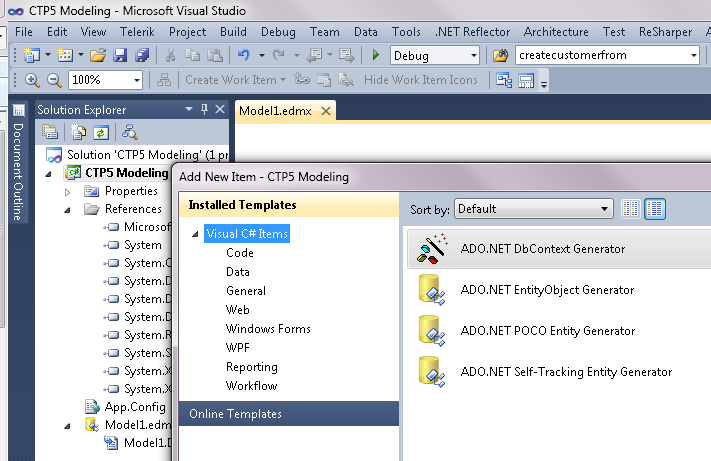
I’ll run through some of these features one blog post at a time. The first is the new T4 Template that gets installed, the ADO.NET DbContext Generator.


T4Template

This creates a more lightweight context that inherits from DbContext. DbContext was introduced in CTP4 and exposes a simpler way of working with most commonly used features of ObjectContext.

generatedcontext


The POCO classes that are generated are much simpler also. Here’s one of the classes. Notice that, unlike the POCO templates we’ve had for a while, these don’t bother with adding in extra logic for two way navigation (the FixupCollection) for the navigation properties.

simpleclasses

Since we don’t need the FixupCollection, the additional file that the POCO template created to define the FixupCollection is still there but it is now empty.

nosupportingcodenecessary

Updating Dates with WPF DatePicker

I spent hours and hours trying to find this piece of information. Finally I was very happy to have Julia Kornich, a technical writer on the EF team, save the day!

By default a DatePicker control does not notify it’s datasource of changes.

Even when you are doing a drag & drop application.

I had a DataGrid where every column but the date columns was pushing changes back to the database.

What was wrong with the DatePicker?

You need to explicitly tell it to do the job with the UpdateSourceTrigger attribute. It is not in the XAML by default. And in order for the notification to happen when the user changes the date, the UpdateSourceTrigger needs to be set to PropertyChanged.

<DatePicker
   SelectedDate="{Binding Path=OrderDate, Mode=TwoWay, 
                          ValidatesOnExceptions=true, 
                          NotifyOnValidationError=true, 
                          UpdateSourceTrigger=PropertyChanged}"

   DataContext="{Binding}"
/>

And there you have it!

Perspectives on Entity Framework at ONETUG Brown Bag Live Meeting

Thanks for attending the ONETUG Brown Bag meeting today where I did a quick look at various approaches to working with EF: database/model/code first, working with POCOs and legacy classes and talking about range of using EF in RAD apps to a more architected enterprise app.

You can find my PowerPoint (which I kept losing thanks to not bringing along my Live Meeting manager) at http://www.slideshare.net/JulieLerman/perspectives-on-ef. The slides are a little more of the zen presentation style… not much in the way of bullet points/details. If you are trying to get the meat of the presentation, it won’t be of much use. Sorry.

The application I showed at the end (MVC app with various projects for entities, model, repositories, testing, interfaces) is from Chapter 27 of my book, Programming Entity Framework 2nd Edition. You can find the sample code for that chapter (as well as others) on the downloads page of my book website.

If you watched the presentation, I had a strange problem when I was trying to modify the model to line a property name  up with my POCO class. The original name was “Name” and the new name was “RoomName”. There was an error indicating that the model still had “Name” which was not true.

The reason for this was because I was using a solution that I’ve used for a number of demos and it had a phantom DLL in the bin directory with a different version of the model, a version that was still using “Name” for that particular property. EF was most likely finding that embedded model first, hence it’s complaints. Once I deleted all of the bin files and rebuilt, things worked as expected. Cleaning the solution did *not* do the trick. I had to explicitly delete those files. These things only happen when you are presenting live and it’s being recorded for posterity. I have made my monthly sacrifice to the demo gods.

Entity Framework NYC Firestarter Slides and Demos

On Monday Sept 27th, Rachel Appel, Steve Bohlen and I presented a full day of Entity Framework presentations at the Entity Framework NYC Firestarter to help developers get started with EF.

The combined slides from our six sessions are on SlideShare.NET at Entity Framework NYC Firestarter (note that there is currently a gap as I await the slides from Session #3).

You can get the demos from my presentations on the downloads page of my book’s website, learnentityframework.com/downloads.

Here are direct links:

Be sure to check the readme.txt files in the downloads.

Watch our blogs, as well as Peter Laudati’s, for the “eventual consistency” scenario where you can find links to all 6 sessions and the slides in one place!

Presentations & Sample Code for my New England Code Camp Talks

I have posted the slides and demos for two of my three NECC14 talks that I did yesterday (Oct 2nd) on the downloads page of my book’s website at   http://learnentityframework.com/downloads/#conf

You’ll find the demos for Persistence Ignorant Entity Framework 4 and n-Tier ASP.NET Web Forms Apps with Entity Framework. Look in the conference section.

The slides are on SlideShare (www.slideshare.net/julielerman).

I did a third talk (Unit Testing for ‘Fraidy Cats Like Me” but it did not have a powerpoint and is not a talk that generated demos.