All posts by Julie

Using SvcUtil to generate WCF service proxy files

There was something I was not grokking about creating a proxy file from a WCF service that could then be used in the client app. I didn’t know what to tell the svcutil.exe tool to build the proxy from. Finally it dawned on me. I needed to have the service running and then point to it’s endpoint. Then svcutil was able to find the service and create the proxy. This may have been a problem for me because I am so used to using VS add web service for proxy creation.

I still have a little more work to do to get this client/service Indigo app running…

Don’t Forget: www.acehaid.org

PDC ShowOff videos online!

Mike Swanson blogs that the PDC Showoff videos are now online. Kudos to Mike and Thomas Lewis for organizing all of this!

There are 25 videos and they are here.

I did manage to see some of the videos during the ShowOff screening after the Going Solo BOF, but there were a lot I missed and now I can watch them. Of the ones I did see that night, my absolute favorite, was the robotic arm ride at LegoLand. It’s called RoboCoaster and is the very last video on page 2.

Mine was pretty dry compared to some of these VERY creative videos. I merely did a screen capture of my Virtual Earth on Ink web application in action and a voice over describing what it was doing. But lots of people actually got out their video cameras and feigned some acting skills (which is very entertaining) and showed some actual code, too! The bar has definitely been set for the next ShowOff challenge.

There were a bunch that were basically advertisements which took some of the fun out of those videos. Mike and Thomas plan to have a few more rules next time.

Don’t Forget: www.acehaid.org

Final touches to getting Peer Chat working in Indigo/WCF Beta2

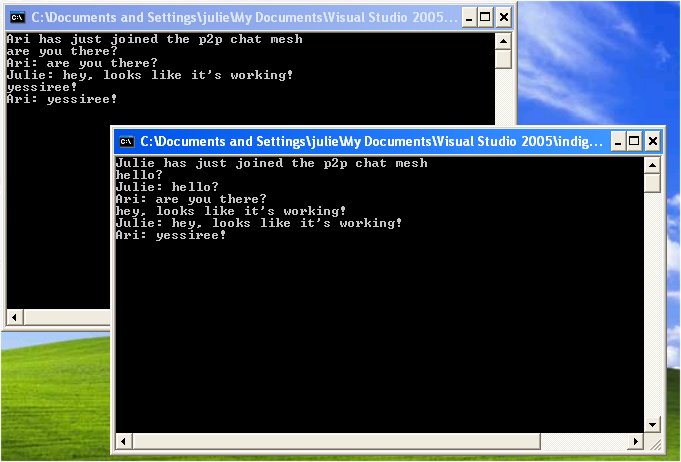
First, proof that I really got it working! Although you can see that one of the messages got lost. (Note Ari doesn’t receive first “hello?” from Julie.) Guess I need to build some Reliable Messaging into this! This dropped first message was consistent every time I ran this. But looking back at the TechEd video from Ari Bixhorn’s Indigo talk, where my demo came from, I see he is having the same problem. I did get rid of the echo after I took these screen shots, just by filtering messages by the local chat member.
I posted previously on getting an Indigo Peer Chat written in Beta1 to run in Beta2. One of the references there is Kevin Ransom’s blog which has excellent info on Peer Chat in Indigo. However, I still had another problem and lucky for me (and you!), Harry Pierson had the same problem I was having and blogged his way through the solution. Phew! After using Kevin’s notes to get PNRP installed (it’s a Windows service), I was getting an error message when testing to see if it worked. Harry had the error too then someone told him that you need to actually START PNRP after you install it before you can run the test that Kevin explains. There is one tiny little problem with Kevin’s steps, but I easily got around it. So putting together Kevin’s and Harry’s information, here is how to get PNRP going on your computer.

From Kevin’s blog:

To enable PNRP you will need a computer running Windows XP Service Pack 2. PNRP is currently not available for Windows 2003 server.

  • Select Add / Remove programs
  • Select Add / Remove Windows components
  • Select Networking Services and click on details
  • ensure that the Peer to peer check box is ticked and then select Okay followed by Next
  • The Windows installer will do its thing then you should select Next  followed by Finish

___________________________________________________________

From Harry’s blog (Harry has an entire P2P category)

From the DOS Prompt type: net start pnrpsvc

He also notes that this will now start automatically from now on
_______________________________________________________

Back to Kevin’s instructions!

To check that everything went well run a netsh command shell by:

  • Select Start followed by Run
  • enter netsh followed by the return key

In the command shell that appears enter the command:

  • netsh p2p pnrp cloud (note from Julie, don’t retype netsh, that won’t work)

followed by the command

  • show list

You should see output similar to:

Scope Id    Addr  State            Name

—– —– —– —————- —–

3     4     1     Virtual          LinkLocal_{XXXXXXXX-XXXX-XXXX-XXXX-XXXXXXXXXXXX}

1     0     1     Virtual          Global_

netsh p2p pnrp cloud>


One other note, I started wtih a Beta1 version of the code and went through a tough (but very educational) process of getting it to work in Beta2. Kevin’s post on Peer Channel is a more efficient way to get started, since I basically ended up with code similar to his post. All of the mods I had to make were in the config file.

It’s pretty scary when you are so early in the game that there is only one result from Google when you are trying to solve a problem. But thank goodness, thank Kevin and thank Harry for their posts! One giant leap for Julie, one small step for demonstrating that Indigo is built for non-plumbers!


Don’t Forget: www.acehaid.org

Don’t Forget: www.acehaid.org
Vermont Healthcare Software company, IDX, sells for $1.2 billion to GE

I suppose it’s great news for Richard Tarrant, who founded this company in Vermont in 1969, as he is making a bid for Senate (though he will likely be running against the ever-popular Bernie Sanders), but the news is causing major worry for many here. IDX employs 800 people in their Burlington headquarters, and another 1600 in offices in other states and in the U.K. It is a big source of pride in Vermont – one of the largest employers and a locally owned company (even though people like to tease Tarrant about his Rolls Royce – very un-Vermonty) – but no longer. And more worriesome is the fact that GE recently purchased Vermont’s Bombardier Capital, for 2.3 billion this summer and then began the process of closing the “Vermont office”.

IDX is definitely a Microsoft shop, too. They are finally shifting some of their VB6 development to .NET.


Don’t Forget: www.acehaid.org

Indigo Beta2 – Some tips for moving from Beta1 and Security goes to the head of the class

… One great resource is Omri Gazitt’s weblog post Porting from Beta1 to Beta2. This helped me resolve most of the problems that I was having with changed attribute names. Omri is on the Indigo team at Microsoft and I will be taking a look at his presentation decks from PDC this weekend.

There was one holdover that was still lingering in my config file though, the securityMode attribute in the [read more…]

[A DevLife post]


Don’t Forget: www.acehaid.org

Devastation here and there

I just watched an update on residents returning to aveland to find nothing, just nothing left. (search their videos for “Waveland 30 days”. It is really sad. As soon as I closed the video, I got a blog referral in my inbox from someone who had linked to a photo I put on my site in January… of Aceh – also obliterated, with nothing left but a very strongly built mosque. That was a really odd juxtaposition of looking at both of those things at the same time.

Don’t Forget: www.acehaid.org

Access mdbs, emails and Windows XP security

Yesterday I had to make some updates to a friend/client’s Access 2003 application. We had some problems with me emailing her updates that were daunting to her and one that was definitely mystifying to me! I do know that you can’t just email MDB files, but these problems were different than that.

The daunting (to her) problem, I was able to solve thanks to this recent discovery. I had zipped one of the MDB files and she needed to unblock the zip file and then unblock the MDB file.

The other problem, I couldn’t solve until she sent me her file. For a second solution, I sent her a small MDB file that contained only a handful of objects for her to import into her MDB file. Rather than zipping, I just renamed the file to whateverfile.mdb.myname and emailed it. She removed “.myname” from the file and imported the objects into her other file. But she got some wierd results when running the macro, which opens four queries then a report. As I couldn’t understand her explanation, I had her send me the file. What I discovered was that all of the relationships between tables that were defined in the queries had been stripped out! I don’t know whta process did this. I had no problem at all doing the import locally and then returning the full file to her. Very odd.

Don’t Forget: www.acehaid.org

Wanna be my neighbor?

Our neighbors are selling their house. They are just up the road from us. I would add to their description below that there are over a hundred acres of woods behind the house (each of us on the road own a chunk of those woods) with trails for hiking, dog walking and cross-country skiing. (But not for snowmobiles or ATVs or hunting.)  You can walk through the woods right to a trail head to get onto the Long Trail, too! There is also DSL available on the road, but no cable. The DSL has been excellent for me with my demanding web access needs. Plus, of course, you will be able to attend meetings of Vermont.NET every month. We are a 4 hour drive from Boston, 3 hours to Montreal and from the Burlington airport, a 50 minute flight on Jet Blue to NYC. Burlington’s airport has lots of airlines with connections through the usual hubs.

.

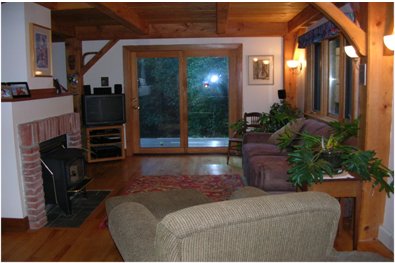
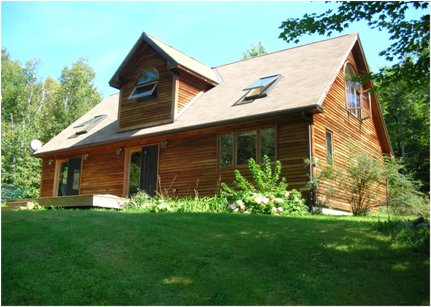
Close to nature & an easy commute to Burlington, Middlebury, and the Mad River Valley, our bright and sunny Timber-Frame home is in move-in condition. Three bedrooms, 2 ½ baths (one w/ jetted tub), recently updated kitchen (w/ new flooring & stainless steel appliances), hardwood floors, finished basement, wrap-around deck, large Post & Beam shed, nearly 13 acres, mountain views – and more! 

In one of Huntington’s “coolest” neighborhoods. 

HUNTINGTON $303,000

Give us a call!
email: silvercoffey at aol dot com